

Claude Chat Completion API Application and Usage
Anthropic Claude is a very powerful AI conversational system. Simply enter a prompt, and it can generate fluent and natural responses in just a few seconds. Claude stands out in the industry with its excellent language understanding and generation capabilities. Today, Claude has long been widely used across various industries and fields, and its influence is becoming increasingly significant. Whether for daily conversations, creative writing, professional consulting, or code programming, Claude can provide astonishing intelligent assistance, greatly improving human work efficiency and creativity.
This document mainly introduces the usage process of Claude Chat Completion API operations. With it, we can easily use the official Claude conversational features.
¶ Application Process
To use the Claude Chat Completion API, first go to the qiyaov Console to obtain your API Token and keep it for later use.

If you have not yet logged in or registered, you will be automatically redirected to the login page and invited to register and log in. After completion, you will automatically return to the current page.
One API Token can call all platform services; there is no need to apply separately for each service. Your first application will receive free credits for a free trial; when credits are insufficient, you can recharge your general balance in the Console.
📘 Full documentation: Claude Chat Completion API →
¶ Basic Usage
Next, you can fill in the corresponding content in the interface, as shown in the image:
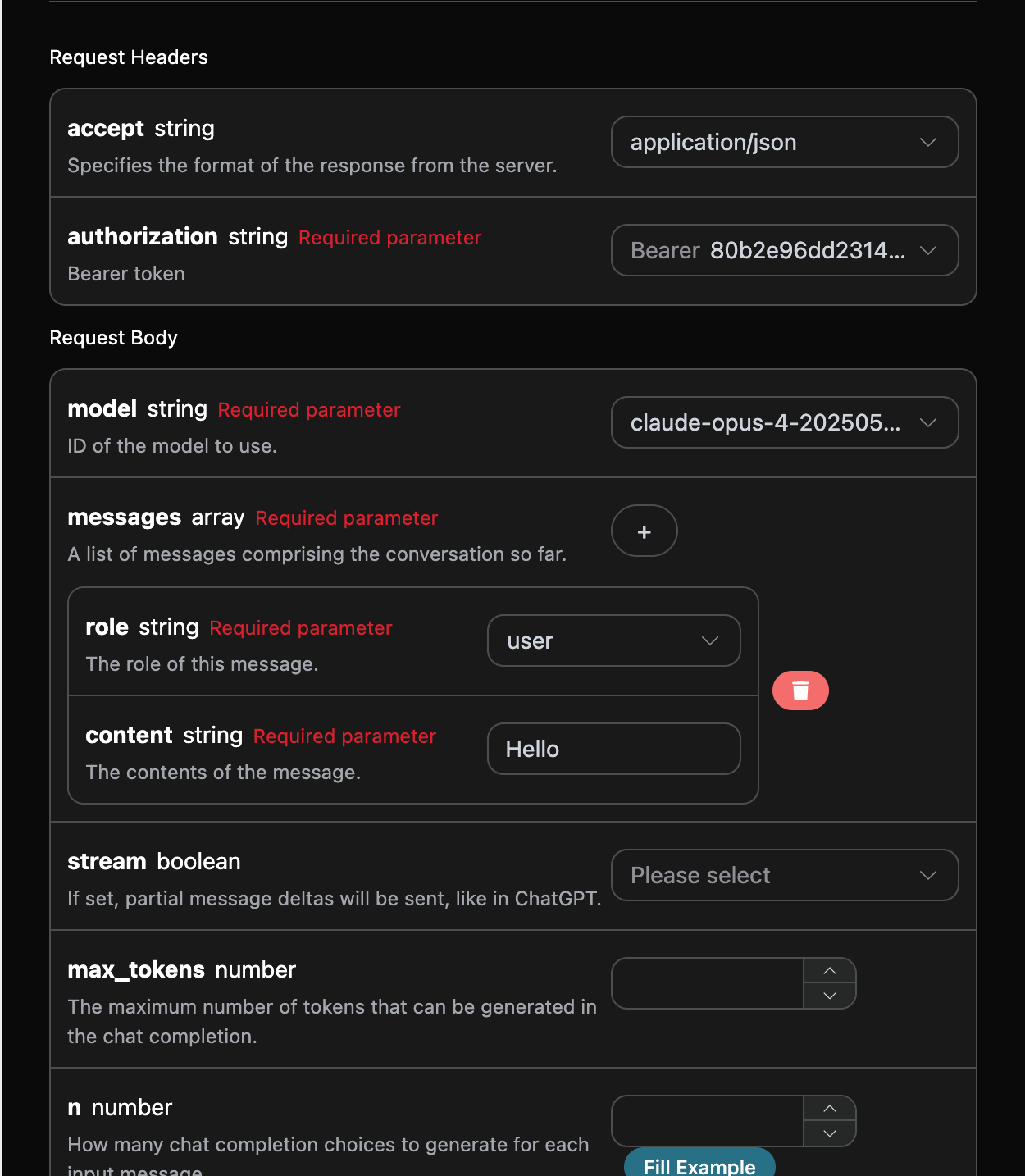
When using this API for the first time, we need to fill in at least three items. One is authorization, which can be selected directly from the dropdown list. Another parameter is model, and it is recommended to use the latest flagship claude-fable-5-1; the original claude-fable-5 can still continue to be called. The last parameter is messages, which is an array of prompt messages, where each element contains role and content; role supports user, assistant, and system, while content is the specific content. Claude Fable 5.1 supports 1 million Token context and a maximum output of 128K Tokens.
At the same time, you can notice that the corresponding invocation code is generated on the right. You can copy the code and run it directly, or click the "Try" button directly for testing.
Common optional parameters:
max_tokens: Limits the maximum number of tokens in a single response.temperature: Generation randomness, between 0 and 2; the larger the value, the more divergent it is.n: How many candidate responses to generate at once.response_format: Return format settings.
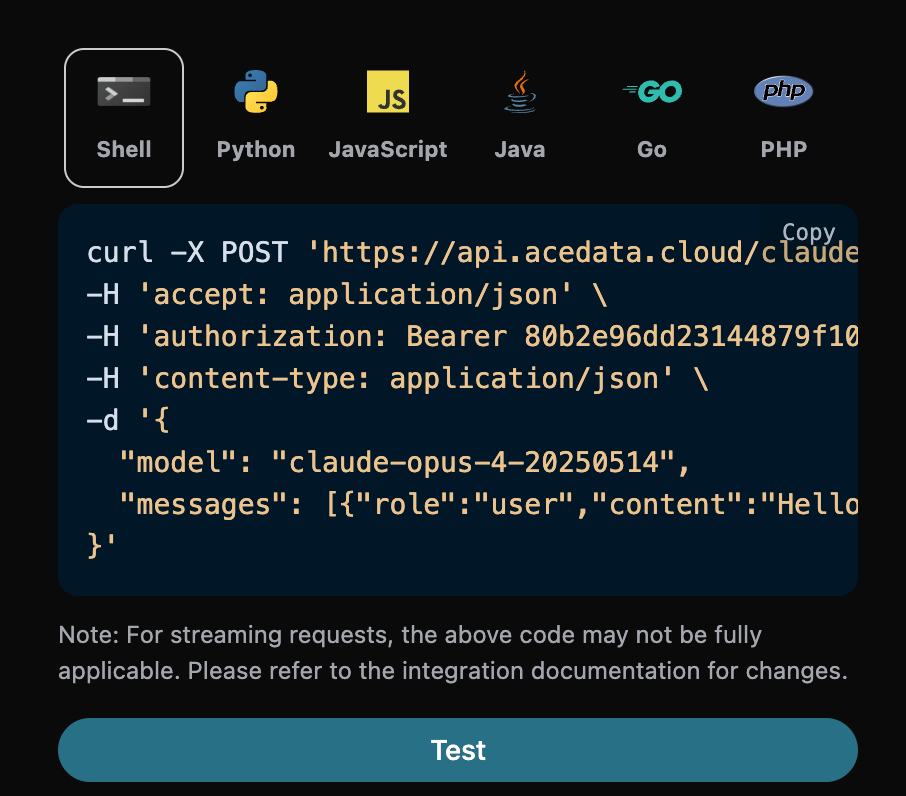
After calling it, we find that the returned result is as follows:
{
  "id": "msg_bdrk_01Q6WN27v95ypCa1kbanAQ6K",
  "model": "claude-opus-4-8",
  "object": "chat.completion",
  "created": 1768619365,
  "choices": [
    {
      "index": 0,
      "message": {
        "role": "assistant",
        "content": "Hello! How can I help you today?"
      },
      "finish_reason": "stop"
    }
  ],
  "usage": {
    "prompt_tokens": 8,
    "completion_tokens": 12,
    "total_tokens": 20,
    "prompt_tokens_details": {
      "cached_tokens": 0,
      "cache_write_tokens": 0
    },
    "completion_tokens_details": {
      "reasoning_tokens": 0
    }
  }
}
The returned result contains multiple fields, introduced as follows:
id, the ID generated for this conversation task, used to uniquely identify this conversation task.model, the Claude official website model selected.choices, the response information provided by Claude for the prompt.usage: Statistical information about tokens for this Q&A session.
In the Chat Completions format, usage.prompt_tokens is the total input amount; prompt_tokens_details.cached_tokens and prompt_tokens_details.cache_write_tokens respectively record cache read and write details. completion_tokens_details.reasoning_tokens is a subset of completion_tokens, and should not be added again when calculating totals or costs. Non-streaming responses may also return a usage.cost object, where amount is the actual credit consumption, currency is the unit of measurement, and list_amount is the amount before discounts, if applicable.
The field name in Chat-compatible is reasoning_tokens; the native Messages API uses output_tokens_details.thinking_tokens. The wire schemas of the two protocols are different, and clients should not mix field names.
Among them, choices contains Claude's response information, and the choices inside it contains the specific information of Claude's response, as shown in the image.
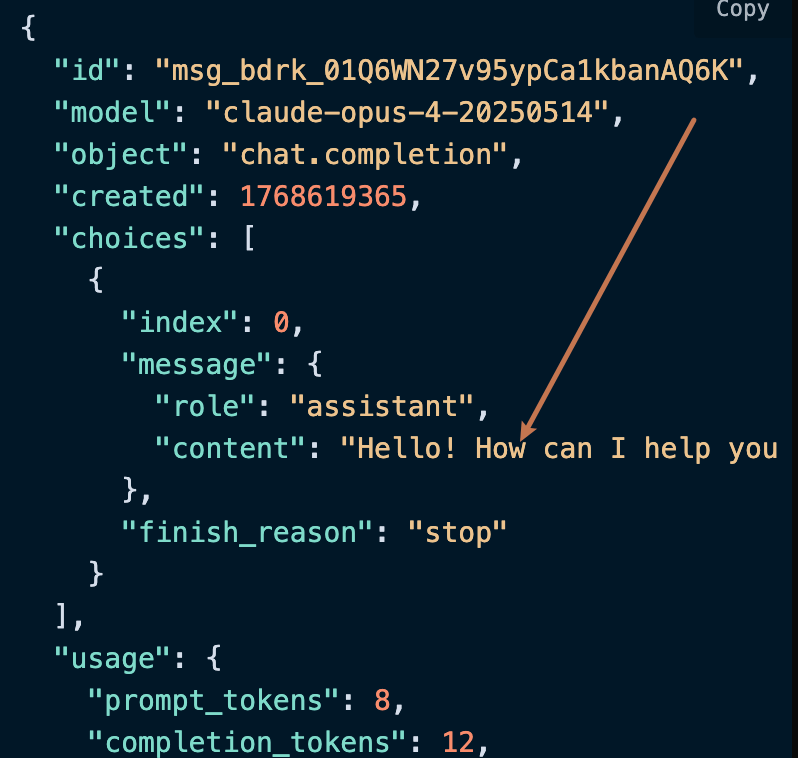
As you can see, the content field in choices contains the specific content of Claude's response.
¶ Streaming Response
This API also supports streaming responses, which is very useful for web integration and can enable a word-by-word display effect on web pages.
If you want to return responses in a stream, you can change the stream parameter in the request header to true.
The modification is shown in the image, but the invocation code needs corresponding changes to support streaming responses.
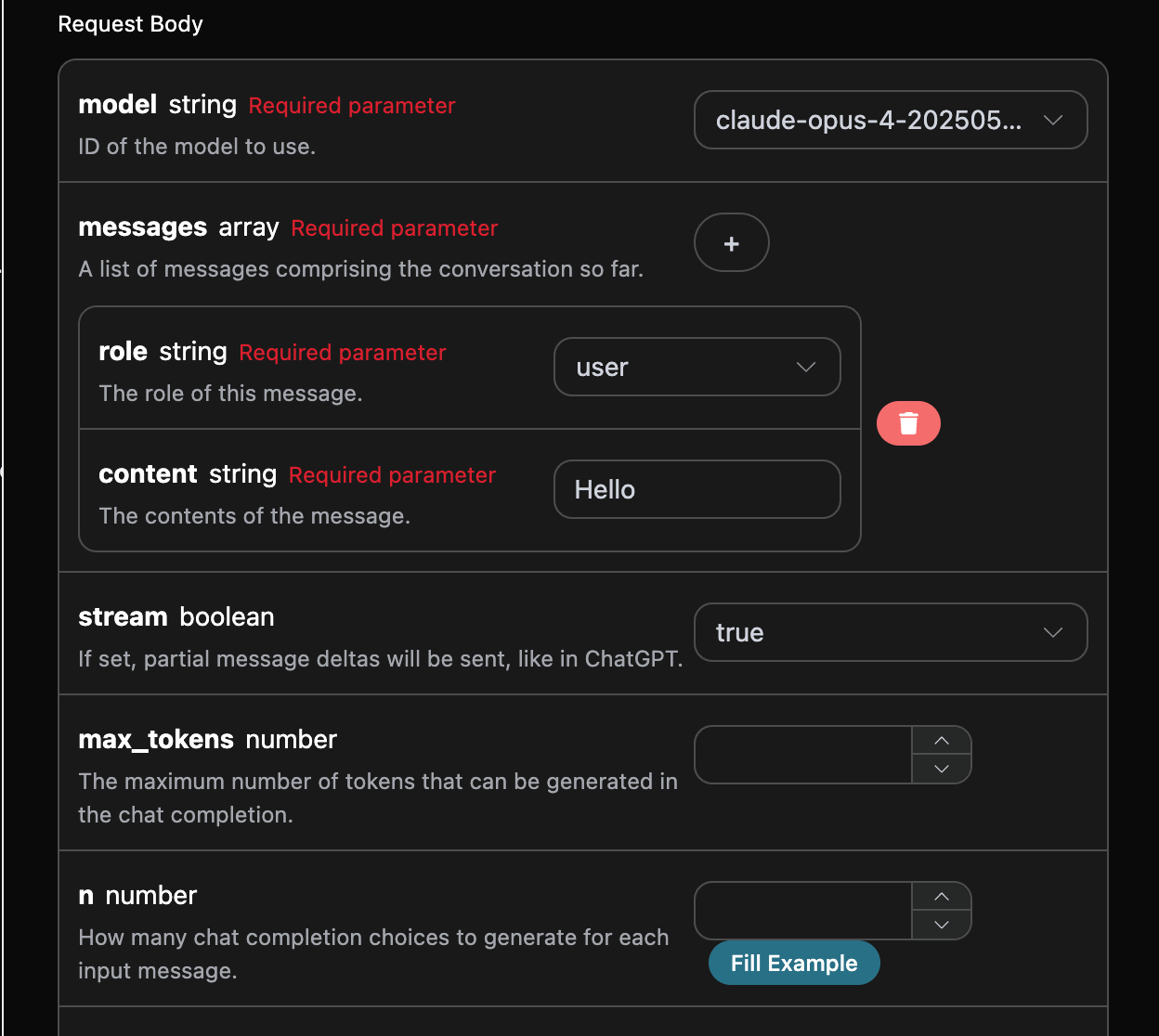
After changing stream to true, the API will return the corresponding JSON data line by line. At the code level, we need to make corresponding changes to obtain line-by-line results.
Python sample invocation code:
import requests

url = "https://api.qiyaov.com/v1/chat/completions"

headers = {
    "accept": "application/json",
    "authorization": "Bearer {token}",
    "content-type": "application/json"
}

payload = {
    "model": "claude-opus-4-20250514",
    "messages": [{"role":"user","content":"Hello"}],
    "stream": True
}

response = requests.post(url, json=payload, headers=headers)
print(response.text)
The output effect is as follows:
data: {"id": "msg_bdrk_01LPPqDjLKMgfSwTRMRty9VT", "object": "chat.completion.chunk", "created": 1768619445, "model": "claude-opus-4-20250514", "system_fingerprint": null, "choices": [{"delta": {"content": "", "role": "assistant"}, "logprobs": null, "finish_reason": null, "index": 0}], "usage": null}

data: {"id": "msg_bdrk_01LPPqDjLKMgfSwTRMRty9VT", "object": "chat.completion.chunk", "created": 1768619445, "model": "claude-opus-4-20250514", "system_fingerprint": null, "choices": [{"delta": {"content": ""}, "logprobs": null, "finish_reason": null, "index": 0}], "usage": null}

data: {"id": "msg_bdrk_01LPPqDjLKMgfSwTRMRty9VT", "object": "chat.completion.chunk", "created": 1768619445, "model": "claude-opus-4-20250514", "system_fingerprint": null, "choices": [{"delta": {"content": "Hello!"}, "logprobs": null, "finish_reason": null, "index": 0}], "usage": null}

data: {"id": "msg_bdrk_01LPPqDjLKMgfSwTRMRty9VT", "object": "chat.completion.chunk", "created": 1768619445, "model": "claude-opus-4-20250514", "system_fingerprint": null, "choices": [{"delta": {"content": " How can I help you"}, "logprobs": null, "finish_reason": null, "index": 0}], "usage": null}

data: {"id": "msg_bdrk_01LPPqDjLKMgfSwTRMRty9VT", "object": "chat.completion.chunk", "created": 1768619445, "model": "claude-opus-4-20250514", "system_fingerprint": null, "choices": [{"delta": {"content": " today?"}, "logprobs": null, "finish_reason": null, "index": 0}], "usage": null}

data: {"id": "msg_bdrk_01LPPqDjLKMgfSwTRMRty9VT", "object": "chat.completion.chunk", "created": 1768619445, "model": "claude-opus-4-20250514", "system_fingerprint": null, "choices": [{"delta": {}, "logprobs": null, "finish_reason": "stop", "index": 0}], "usage": null}

data: {"id": "msg_bdrk_01LPPqDjLKMgfSwTRMRty9VT", "object": "chat.completion.chunk", "created": 1768619445, "model": "claude-opus-4-20250514", "system_fingerprint": null, "choices": [], "usage": {"prompt_tokens": 8, "completion_tokens": 12, "total_tokens": 20, "prompt_tokens_details": {"cached_tokens": 0, "cache_write_tokens": 0}, "completion_tokens_details": {"reasoning_tokens": 0}}}

data: [DONE]
As you can see, there are many data entries in the response. The choices within data are the latest response content, which is consistent with the content introduced above. choices contains the newly added response content, and you can integrate it into your system according to the results. At the same time, the end of a streaming response is determined based on the content of data. If the content is [DONE], it indicates that the streaming response has completely ended. The returned data results contain multiple fields, described as follows:
id, the ID generated for this conversation task, used to uniquely identify this conversation task.model, the Claude official website model selected.choices, the response information given by Claude for the prompt.
JavaScript is also supported. For example, the streaming invocation code for Node.js is as follows:
const options = {
  method: "post",
  headers: {
    accept: "application/json",
    authorization: "Bearer {token}",
    "content-type": "application/json",
  },
  body: JSON.stringify({
    model: "claude-opus-4-20250514",
    messages: [{ role: "user", content: "Hello" }],
    stream: true,
  }),
};

fetch("https://api.qiyaov.com/v1/chat/completions", options)
  .then((response) => response.json())
  .then((response) => console.log(response))
  .catch((err) => console.error(err));
Java sample code:
JSONObject jsonObject = new JSONObject();
jsonObject.put("model", "claude-opus-4-20250514");
jsonObject.put("messages", [{"role":"user","content":"Hello"}]);
jsonObject.put("stream", true);
MediaType mediaType = "application/json; charset=utf-8".toMediaType();
RequestBody body = jsonObject.toString().toRequestBody(mediaType);
Request request = new Request.Builder()
  .url("https://api.qiyaov.com/v1/chat/completions")
  .post(body)
  .addHeader("accept", "application/json")
  .addHeader("authorization", "Bearer {token}")
  .addHeader("content-type", "application/json")
  .build();

OkHttpClient client = new OkHttpClient();
Response response = client.newCall(request).execute();
System.out.print(response.body!!.string())
Other languages can be adapted separately. The principle is the same.
¶ Multi-turn Conversations
If you want to integrate multi-turn conversation functionality, you need to upload multiple prompts in the messages field. A specific example of multiple prompts is shown in the image below:
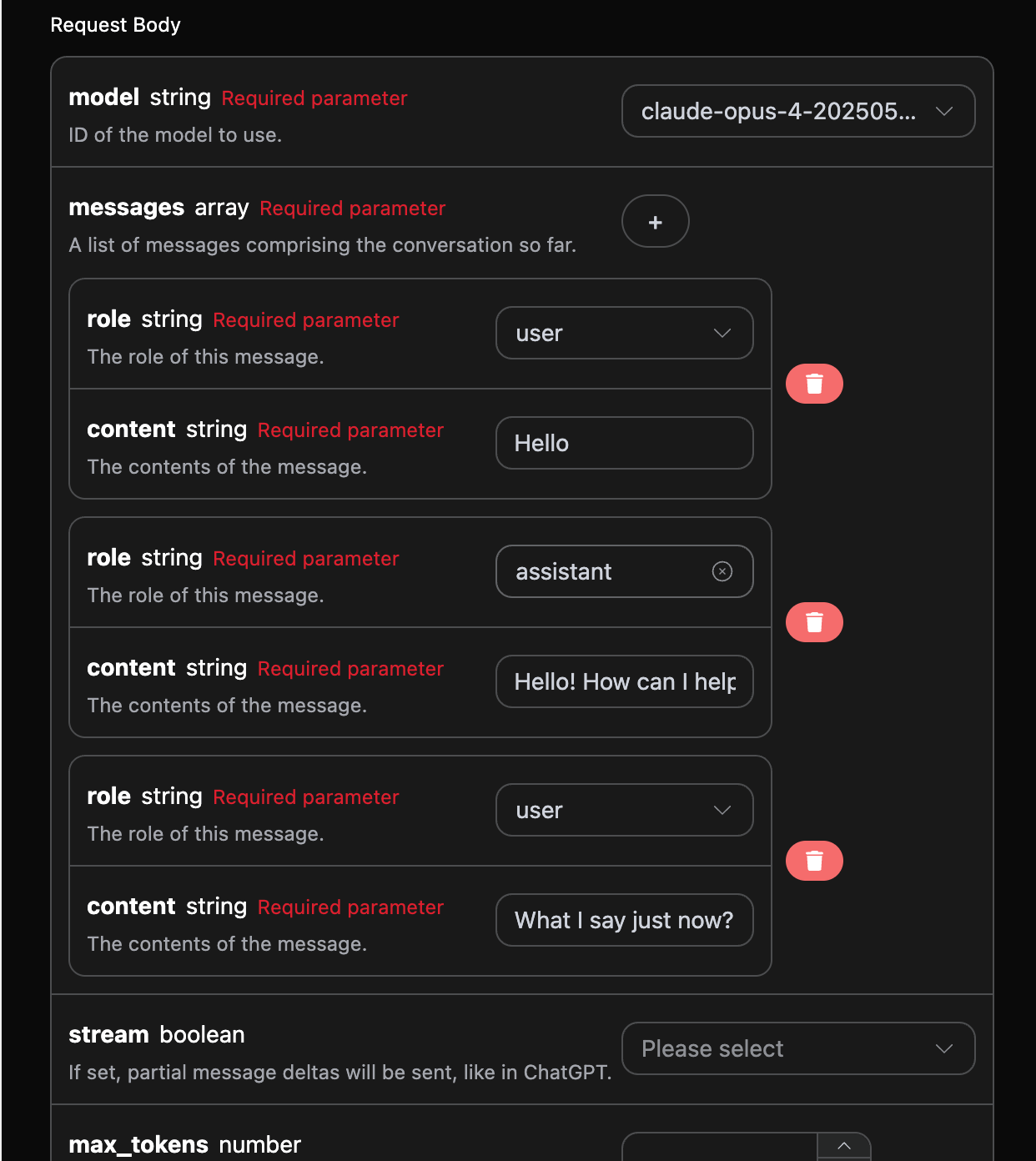
Python sample invocation code:
import requests

url = "https://api.qiyaov.com/v1/chat/completions"

headers = {
    "accept": "application/json",
    "authorization": "Bearer {token}",
    "content-type": "application/json"
}

payload = {
    "model": "claude-opus-4-20250514",
    "messages": [{"role":"user","content":"Hello"},{"role":"assistant","content":"Hello! How can I help you today?"},{"role":"user","content":"What I say just now?"}]
}

response = requests.post(url, json=payload, headers=headers)
print(response.text)
By uploading multiple prompts, you can easily implement multi-turn conversations and obtain the following response:
{
  "id": "msg_bdrk_01Y1wfQmd89g968TVbFu57Yc",
  "model": "claude-opus-4-20250514",
  "object": "chat.completion",
  "created": 1768619674,
  "choices": [
    {
      "index": 0,
      "message": {
        "role": "assistant",
        "content": "You said \"Hello\" - that was your first message to me in our conversation."
      },
      "finish_reason": "stop"
    }
  ],
  "usage": {
    "prompt_tokens": 29,
    "completion_tokens": 20,
    "total_tokens": 49,
    "prompt_tokens_details": {
      "cached_tokens": 0,
      "cache_write_tokens": 0
    },
    "completion_tokens_details": {
      "reasoning_tokens": 0
    }
  }
}
As you can see, the information contained in choices is consistent with the basic usage content. This contains the specific content of Claude's responses to multiple conversations, so that corresponding questions can be answered based on the multiple conversation contents.
¶ Deep Thinking
New-generation Claude models may reason according to the model's default policy, without needing to be triggered through the -thinking model suffix. Chat-compatible responses use the OpenAI-compatible usage field completion_tokens_details.reasoning_tokens. reasoning_tokens is already included in completion_tokens; do not add them together repeatedly. Reasoning and visible body text share the output token limit, so when max_tokens is small, the body text may be empty or truncated; in this case, please increase the output budget, or select a lower reasoning effort when supported by the model being used.
If native thinking, output_config.effort, thinking content blocks, and signature return are required, please use /v1/messages. The usage field corresponding to Messages is output_tokens_details.thinking_tokens; do not mix it with the Chat-compatible completion_tokens_details.reasoning_tokens.
¶ Vision Model
claude-sonnet-4-20250514 is a multimodal large language model developed by Claude. It adds visual understanding capabilities based on claude-4. This model can process both text and image inputs simultaneously, achieving cross-modal understanding and generation.
The text processing of the claude-sonnet-4-20250514 model is consistent with the basic usage described above. Below is a brief introduction to how to use the model's image processing capabilities.
The image processing capability of the claude-sonnet-4-20250514 model is mainly enabled by adding a type field to the original content content. Through this field, it can determine whether the upload is text or an image, thereby using the image processing capability of the claude-sonnet-4-20250514 model. The following mainly describes two ways to call this capability, using Curl and Python.
- Curl script method
curl -X POST 'https://api.qiyaov.com/v1/chat/completions' \
-H 'accept: application/json' \
-H 'authorization: Bearer {token}' \
-H 'content-type: application/json' \
-d '{
    "model": "claude-sonnet-4-20250514",
    "messages": [
      {
        "role": "user",
        "content": [
          {
            "type": "text",
            "text": "What'\''s in this image?"
          },
          {
            "type": "image_url",
            "image_url": {
              "url": "https://cdn.acedata.cloud/ueugot.png"
            }
          }
        ]
      }
    ]
  }'
- Python script method
import requests

url = "https://api.qiyaov.com/v1/chat/completions"

headers = {
    "accept": "application/json",
    "authorization": "Bearer {token}",
    "content-type": "application/json"
}

payload = {
    "model": "claude-sonnet-4-20250514",
    "messages": [
        {
            "role": "user",
            "content": [
                {
                    "type": "text", "text": "What's in this image?"
                },
                {
                    "type": "image_url",
                    "image_url": {
                        "url": "https://cdn.acedata.cloud/ueugot.png"
                    }
                },
            ],
        }
    ]
}

response = requests.post(url, json=payload, headers=headers)
print(response.text)
Then the following result can be obtained. The field information in the result is consistent with the above. The specific details are as follows:
{
  "id": "msg_bdrk_01NCrxpZmV17bhQJJRQEFEb9",
  "model": "claude-sonnet-4-20250514",
  "object": "chat.completion",
  "created": 1768628904,
  "choices": [
    {
      "index": 0,
      "message": {
        "role": "assistant",
        "content": "This image shows an API request configuration interface for what appears to be an AI chat completion service. Here are the key elements:\n\n**Request Body Parameters:**\n\n1. **model** (required string) - Set to \"claude-opus-4-202505...\" - specifies which AI model to use\n\n2. **messages** (required array) - Contains the conversation history with:\n   - **role** (required string) - Set to \"user\" \n   - **content** (required string) - Contains \"Hello\" as the message content\n\n3. **stream** (boolean) - Set to \"true\" - enables partial message deltas like in ChatGPT\n\n4. **max_tokens** (number) - Field for setting maximum tokens that can be generated in the response\n\n5. **n** (number) - Specifies how many chat completion choices to generate for each input\n\nThe interface has a dark theme with white text on black/dark gray backgrounds. There's a \"Fill Example\" button at the bottom right and various dropdown menus and input fields for configuring the API request parameters. A red trash/delete icon is visible, likely for removing message entries."
      },
      "finish_reason": "stop"
    }
  ],
  "usage": {
    "prompt_tokens": 1570,
    "completion_tokens": 252,
    "total_tokens": 1822,
    "prompt_tokens_details": {
      "cached_tokens": 0,
      "cache_write_tokens": 0
    },
    "completion_tokens_details": {
      "reasoning_tokens": 0
    }
  }
}
It can be seen that the response content is based on the image. Therefore, through the above two methods, you can easily use the text and image processing capabilities of the claude-3-7-sonnet-20250219 model.
¶ Error Handling
When calling the API, if an error is encountered, the API will return the corresponding error code and information. For example:
400 token_mismatched: Bad request, possibly due to missing or invalid parameters.400 api_not_implemented: Bad request, possibly due to missing or invalid parameters.401 invalid_token: Unauthorized, invalid or missing authorization token.429 too_many_requests: Too many requests, you have exceeded the rate limit.500 api_error: Internal server error, something went wrong on the server.
¶ Error Response Example
{
  "success": false,
  "error": {
    "code": "api_error",
    "message": "fetch failed"
  },
  "trace_id": "2cf86e86-22a4-46e1-ac2f-032c0f2a4e89"
}
¶ Conclusion
Through this document, you have learned how to use the Claude Chat Completion API to easily implement the conversation functionality of official Claude. We hope this document can help you better integrate and use this API. If you have any questions, please feel free to contact our technical support team.