

Using qiyaov in Jan
Jan is an offline-first open-source AI desktop client that can both run models locally and connect to OpenAI-compatible endpoints through the Remote Engine. This article explains how to connect to qiyaov.
¶ Application Process
To connect qiyaov in Jan, first go to the qiyaov Console, obtain your API Token, and keep it for later use.

If you have not yet logged in or registered, you will be automatically redirected to the login page to register and log in. After logging in or registering, you will automatically return to the current page.
Free credits are provided during the initial application, allowing you to experience qiyaov's model services for free.
¶ Download Jan
Go to the Jan website and download the version for your platform (Windows, macOS, Linux). For Apple Silicon devices, download the arm64 package for optimal performance.
¶ Configure qiyaov
Jan divides models into two categories: Local Engine (runs locally) and Remote Engine (third-party APIs). qiyaov uses the OpenAI-compatible protocol and is connected through the Remote Engine.
Open Jan, go to Settings → Model Providers, find the OpenAI card, and edit it:
| Field | Value | Description |
|---|---|---|
| API Key | Your qiyaov Token | Token copied from the console |
| Base URL | https://api.qiyaov.com/v1 |
Must end with /v1, with no trailing slash |
The requirement that the Base URL must end with
/v1is an explicit convention in Jan's official documentation. If you do not want to overwrite the original OpenAI configuration, you can use “+ Add Provider” to create a new Provider of typeopenai-compatibleand fill in the same content.
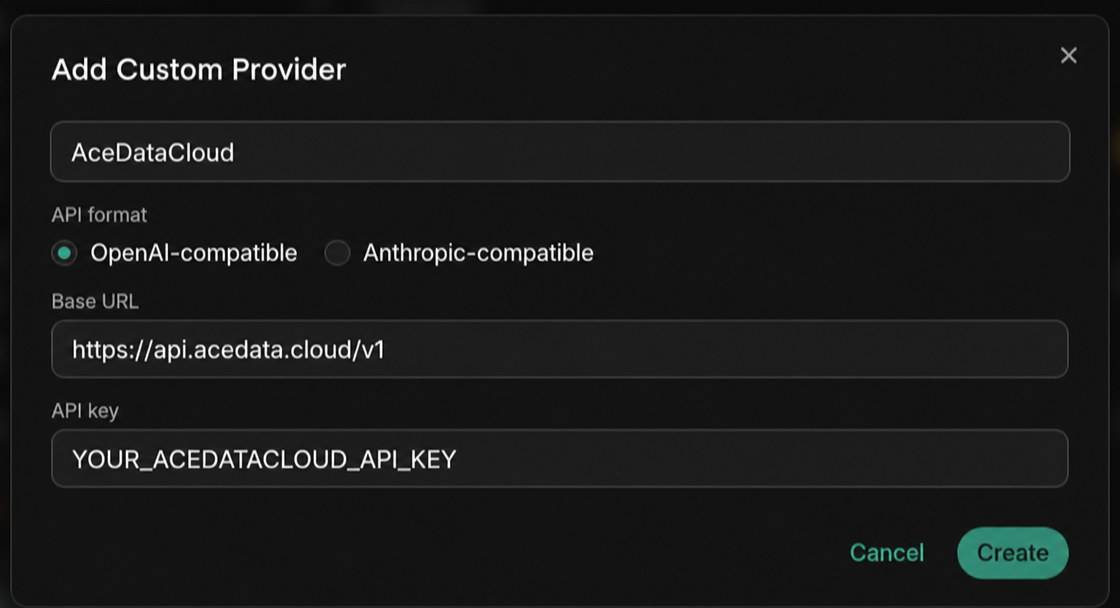
After saving the custom Provider, Jan will first attempt to call {Base URL}/models to retrieve the model list. If the current version or endpoint does not return an available list, click + Add Model at the bottom of the same edit page to manually enter the model ID. After adding it, the model will appear in the dropdown at the top left, with a “Cloud” icon to distinguish it from remote / local models.
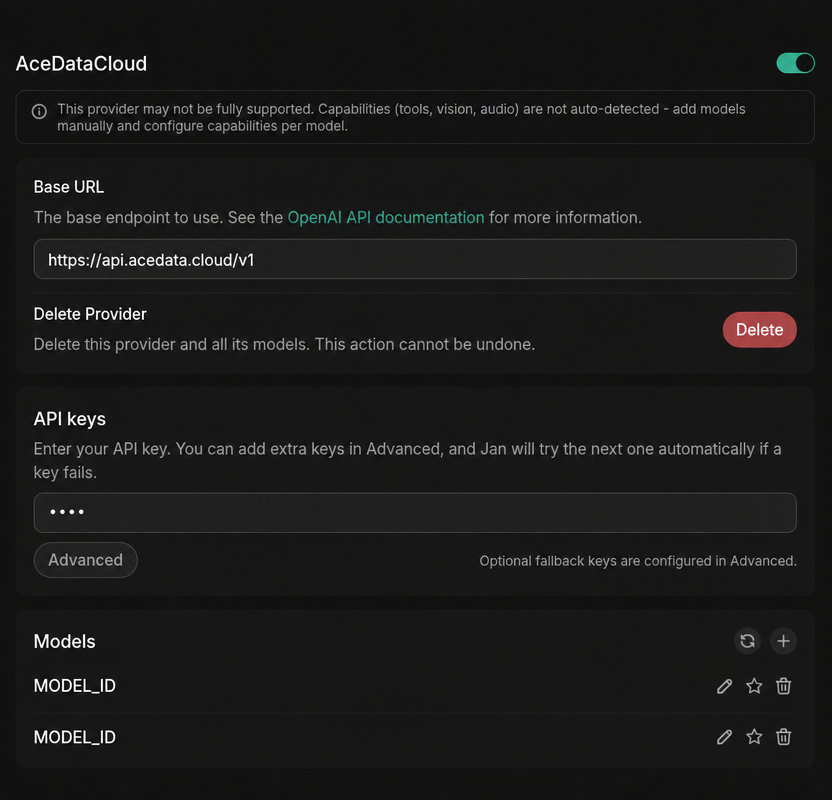
MODEL_IDis a placeholder; please go to the model catalog to view and replace it with the target model name (for example,claude-opus-5,gpt-6-sol); for precise verification, use theidvalue in the/v1/modelsresponse. This value is the model name used by the APImodelparameter, not the UUID of the service or API.
¶ Select a Model
The model catalog is continuously updated. Prioritize using the model list automatically loaded by the client; if you need to enter it manually, first request GET https://api.qiyaov.com/v1/models, copy the target model's id value from the response's data array, and then select according to the context, image, and tool-calling capabilities supported by the client.
¶ Verify the Integration
If you are unsure whether the issue is with Jan or the network, you can first use curl to directly verify the endpoint (replace {token} with your Token):
curl -X POST 'https://api.qiyaov.com/v1/chat/completions' \
  -H 'Authorization: Bearer {token}' \
  -H 'Content-Type: application/json' \
  -d '{
    "model": "MODEL_ID",
    "messages": [{"role": "user", "content": "ping"}]
  }'
Returning an OpenAI-compatible chat.completion object indicates that both the Token and endpoint are ready; if HTTP 403 used_up is returned, it means the Token is valid but the balance is insufficient. Simply recharge in the console.
¶ Advanced: Local + Cloud Hybrid
Jan includes an optional local OpenAI-compatible API Server (Settings → Local API Server). Once enabled, it listens on http://localhost:1337/v1/chat/completions and runs the local models you have downloaded. This allows you to point the Base URL to localhost for free debugging in frameworks such as LangChain / LlamaIndex, then switch to qiyaov remote models for complex tasks. Conversation context will not be lost when switching models.
¶ Frequently Asked Questions
¶ Connection error or 404
Usually, the Base URL is missing /v1. Change it to https://api.qiyaov.com/v1 (it must end with /v1, and must not be written as .../openai/v1).
¶ 401 Unauthorized
Please confirm that the API Key contains the qiyaov Token (without the Bearer prefix and without extra spaces), and that the associated application's balance is sufficient.
¶ Remote models do not appear in the dropdown
First click the model refresh button to trigger /v1/models; if automatic discovery fails, manually use + Add Model and add the model id value from the catalog exactly as is.
¶ Can I upload images for the model to analyze?
Yes, but you need to select a model from the current model catalog that explicitly supports visual input.