

Producer Audios Generation API Integration Guide
This article will introduce a Producer Audios Generation API integration guide, which can generate Producer official music by entering custom parameters.
¶ Application Process
To use the Producer Audios Generation API, first go to the qiyaov Console to obtain your API Token, and keep it for later use.

If you have not yet logged in or registered, you will be automatically redirected to the login page to register and log in. After completion, you will automatically return to the current page.
One API Token can call all services on the platform, with no need to apply separately for each service. The first application will grant free credits for free trial; when credits are insufficient, you can top up the general balance in the Console.
📘 Complete documentation: Producer Audios Generation API →
¶ Basic Usage
For whatever song you want, you can enter any text. For example, if I want to generate a song about Christmas, I can enter a song for Christmas, as shown in the figure:
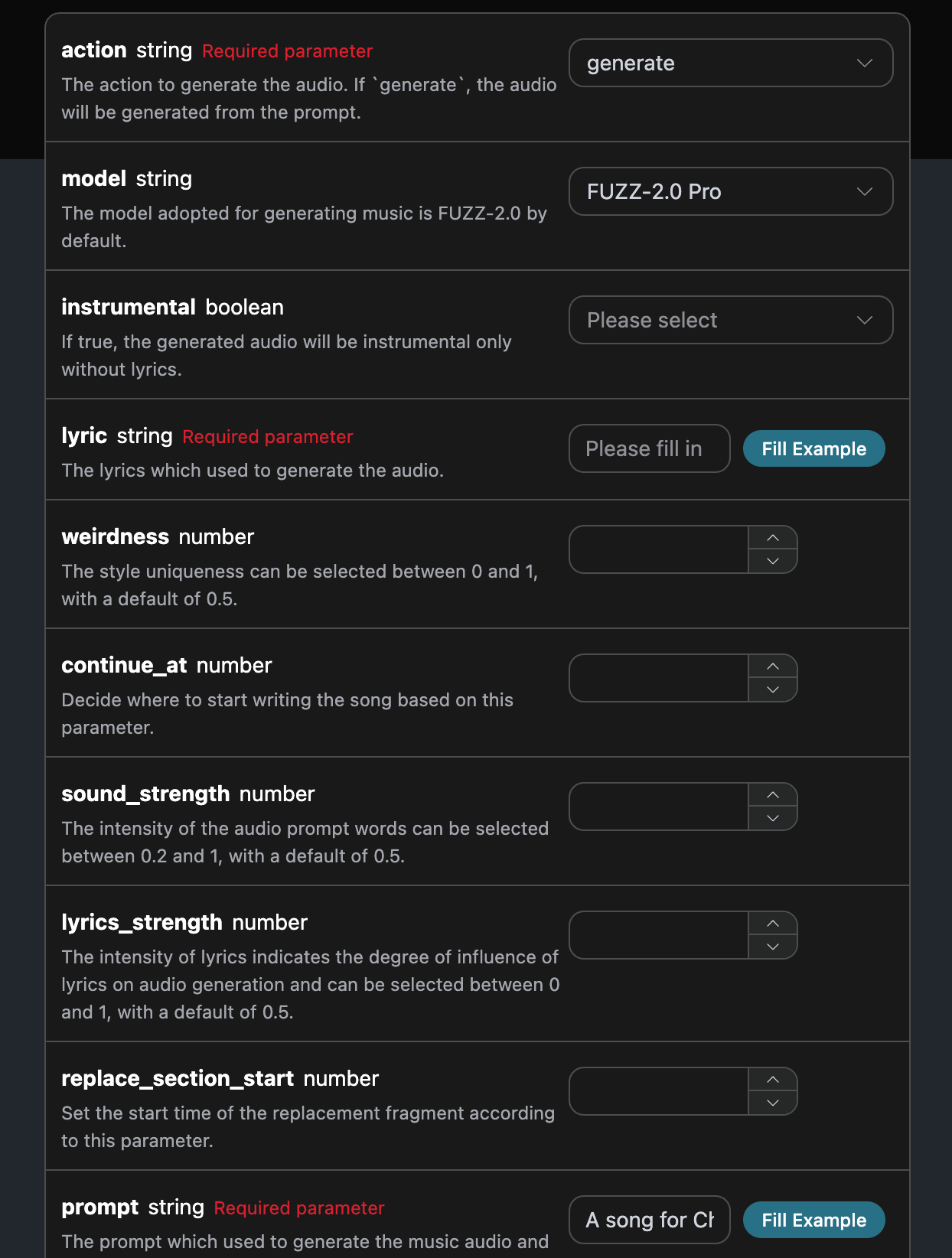
You can see that here we set the Request Headers, including:
accept: What format of response result you want to receive. Here it is filled in asapplication/json, which is JSON format.authorization: The key for calling the API, which can be directly selected from the dropdown after application.
In addition, the Request Body parameters include:
action: The action of this music generation task. To generate a song, usegenerate.model: The model used to create the song. Currently, the main ones are: FUZZ-2.0 Pro, FUZZ-2.0, FUZZ-2.0 Raw, FUZZ-1.1 Pro, FUZZ-1.0 Pro, FUZZ-1.0, FUZZ-1.1, FUZZ-0.8.lyric: The lyrics content of the song.custom: Whether to generate the song in a custom way.prompt: The prompt in inspiration mode.title: Song title information.audio_id: Reference song ID, used for continuation/cover and other operations.continue_at: Continue the song from the specified number of seconds.replace_section_start/replace_section_end: The start and end time of the replacement segment, in seconds.lyrics_strength: Lyrics strength, indicating the degree of influence of lyrics in audio generation. Optional between 0 and 1, default is 0.7.sound_strength: Audio prompt strength, optional between 0.2 and 1, default is 0.7.cover_strength: Cover strength, between 0.2 and 1, default is 1.weirdness: Style weirdness, optional between 0 and 1, default is 0.5.callback_url: The URL that needs callback results.async: Optional. When set totrue, the API immediately returnstask_id, with no need to providecallback_url; then obtain results by polling through the corresponding task query API.instrumental: Whether it is lyric-free mode.
After selection, you can find that the corresponding code is also generated on the right side, as shown in the figure:
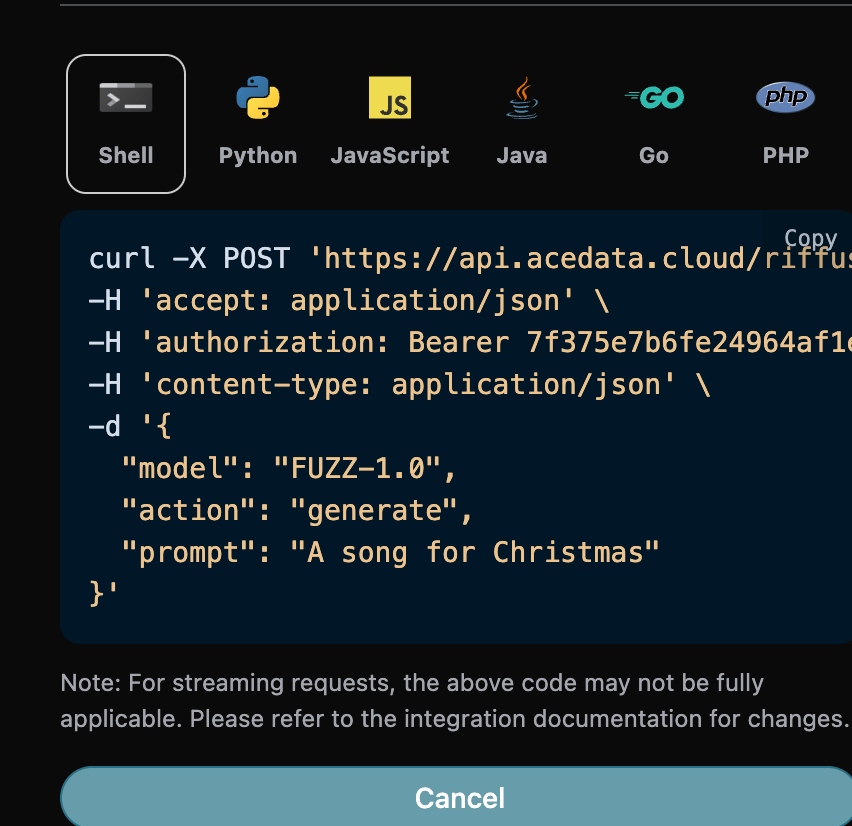
Click the “Try” button to test. As shown in the figure above, here we get the following result:
{
  "success": true,
  "task_id": "82fd443a-903a-4f18-8028-12d2f8a0a4be",
  "trace_id": "d85839fa-0bb1-42da-a9fc-cd582c29027d",
  "data": [
    {
      "id": "6c947f13-a3c5-4b9c-8609-5639c37cdc2d",
      "title": "Untitled",
      "image_url": "https://cdn.acedata.cloud/e724d7f13d.png",
      "lyric": "[Instrumental]",
      "audio_url": "https://cdn.acedata.cloud/assets/examples/fish/5ade0339-5f11-487e-aacc-06a908271706-8e3fcb0e5547.mp3",
      "video_url": null,
      "image_id": "6c947f13-a3c5-4b9c-8609-5639c37cdc2d",
      "topic": null,
      "seed": "2450882164",
      "sound": "A song for Christmas",
      "created_at": "2025-12-30T17:18:23.232911Z",
      "model": "FUZZ-2.0 Pro",
      "progress": "100%",
      "state": "succeeded",
      "duration": "181.3014058956916"
    }
  ]
}
There are multiple fields in the returned result, introduced as follows:
success, the status of the music generation task at this time.data, the result of this music task.id, the ID of the music generation task at this time.sound, the prompt of the music generation task at this time.seed, the seed value of the music generation task at this time.audio_url, the audio link of the music generation task at this time.image_url, the cover link of the music generation task at this time.image_id, the cover ID of the music generation task at this time.state, the status of the music generation task at this time.duration, the duration information of the music at this time.progress, the progress value of the music task at this time.model, the model information used by the music generation task at this time.lyric, the lyrics information of the music generation task at this time.
You can see that we have obtained the music information we wanted to generate. We only need to obtain the generated Producer music according to the music link address in data in the result.
In addition, if you want to generate the corresponding integration code, you can directly copy and generate it. For example, the CURL code is as follows:
curl -X POST 'https://api.qiyaov.com/producer/audios' \
-H 'accept: application/json' \
-H 'authorization: Bearer {token}' \
-H 'content-type: application/json' \
-d '{
  "action": "generate",
  "model": "FUZZ-2.0 Pro",
  "prompt": "A song for Christmas"
}'
¶ Custom Generation
If you want to customize and generate lyrics, you can enter lyrics:
At this time, the lyric field can pass in content similar to the following:
[Verse]Woke up with the sun in my eyesNo clouds above just blue in the skiesShoes on my feet I’m ready to runEvery step feels like a loaded gun[Chorus]Happy days are rolling inLet the joy beneath my skinNo more shadows no more liesJust the truth that lifts me high[Verse 2]Dancing through the city streetsA rhythm pounding in my heartbeatStrangers smile it’s catching onThis world’s a stage we’re all a song[Chorus]Happy days are rolling inLet the joy beneath my skinNo more shadows no more liesJust the truth that lifts me high[Bridge]Throw your worries out the doorLet them sink to the ocean floorWe’re alive and it’s enoughLife is messy but it’s love[Chorus]Happy days are rolling inLet the joy beneath my skinNo more shadows no more liesJust the truth that lifts me high
Next, we need to customize and generate a song according to the lyrics, title, and style, and can specify the following content:
- lyric: Lyrics text
- custom: Set to
true, which represents custom generation. This parameter defaults to false, which represents generation usingprompt. - title: The title of the song.
An example is as follows:
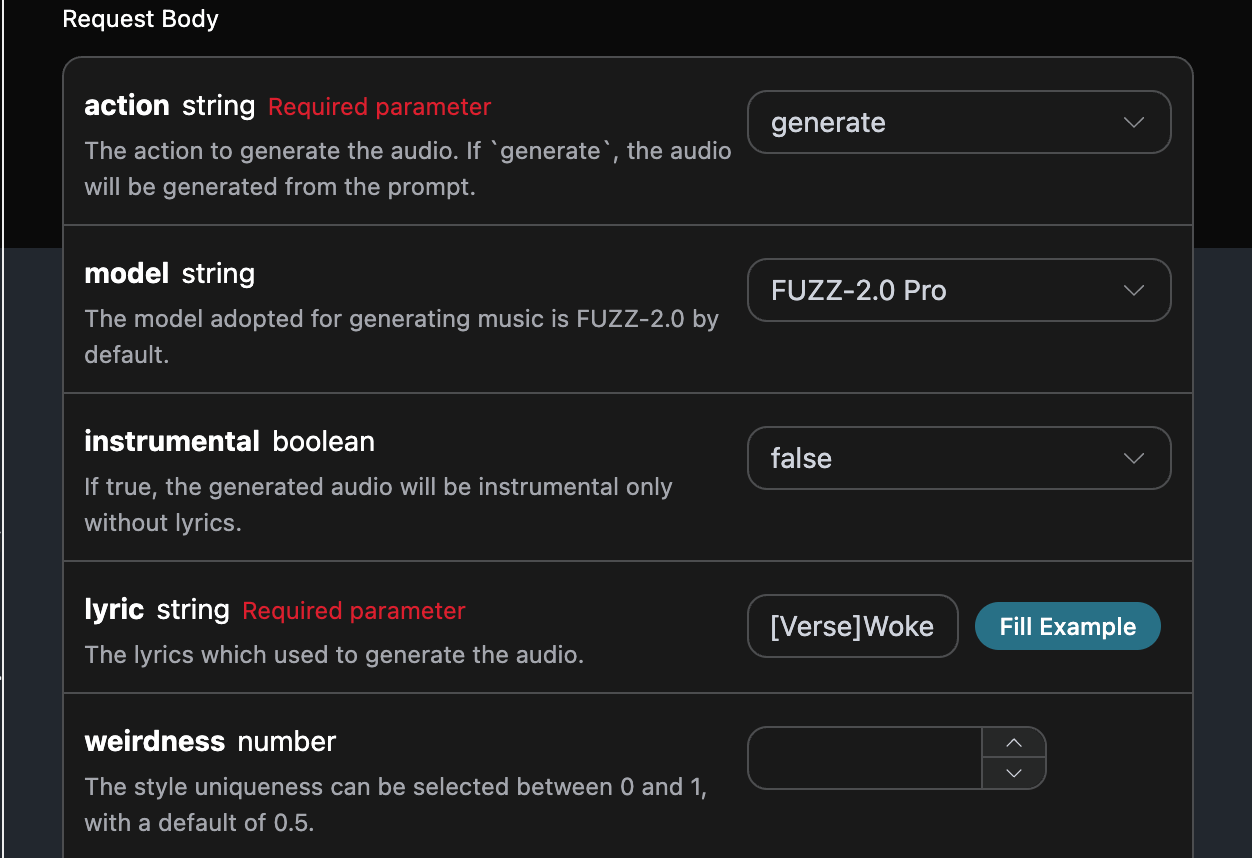
After completing the fields, the following code is automatically generated:
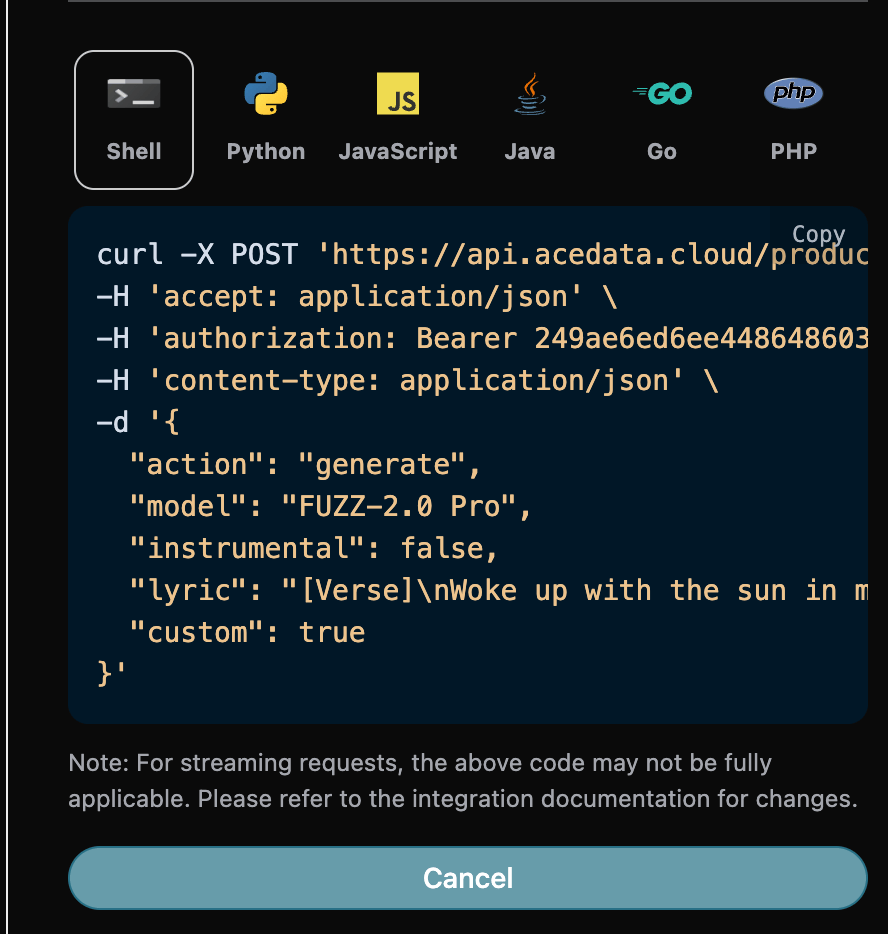
The corresponding code:
curl -X POST 'https://api.qiyaov.com/producer/audios' \
-H 'accept: application/json' \
-H 'authorization: Bearer {token}' \
-H 'content-type: application/json' \
-d '{
  "action": "generate",
  "model": "FUZZ-2.0 Pro",
  "instrumental": false,
  "lyric": "[Verse]\nWoke up with the sun in my eyes\nNo clouds above just blue in the skies\nShoes on my feet I’m ready to run\nEvery step feels like a loaded gun\n[Chorus]\nHappy days are rolling in\nLet the joy beneath my skin\nNo more shadows no more lies\nJust the truth that lifts me high\n[Verse 2]\nDancing through the city streets\nA rhythm pounding in my heartbeat\nStrangers smile it’s catching on\nThis world’s a stage we’re all a song\n[Chorus]\nHappy days are rolling in\nLet the joy beneath my skin\nNo more shadows no more lies\nJust the truth that lifts me high\n[Bridge]\nThrow your worries out the door\nLet them sink to the ocean floor\nWe’re alive and it’s enough\nLife is messy but it’s love\n[Chorus]\nHappy days are rolling in\nLet the joy beneath my skin\nNo more shadows no more lies\nJust the truth that lifts me high",
  "custom": true
}'
The test is allowed, and the generated result is similar.
{
  "success": true,
  "task_id": "9f58bbd4-855a-4233-ac45-b63bf9168e02",
  "trace_id": "145ad117-6ce7-42dd-af12-70751c5284fc",
  "data": [
    {
      "id": "38d3b9e2-0dfb-4338-b2a7-15e45656ed32",
      "title": "Woke up with the sun in my eyes",
      "image_url": "https://cdn.acedata.cloud/e724d7f13d.png",
      "lyric": "[Verse]\nWoke up with the sun in my eyes\nNo clouds above just blue in the skies\nShoes on my feet I’m ready to run\nEvery step feels like a loaded gun\n[Chorus]\nHappy days are rolling in\nLet the joy beneath my skin\nNo more shadows no more lies\nJust the truth that lifts me high\n[Verse 2]\nDancing through the city streets\nA rhythm pounding in my heartbeat\nStrangers smile it’s catching on\nThis world’s a stage we’re all a song\n[Chorus]\nHappy days are rolling in\nLet the joy beneath my skin\nNo more shadows no more lies\nJust the truth that lifts me high\n[Bridge]\nThrow your worries out the door\nLet them sink to the ocean floor\nWe’re alive and it’s enough\nLife is messy but it’s love\n[Chorus]\nHappy days are rolling in\nLet the joy beneath my skin\nNo more shadows no more lies\nJust the truth that lifts me high",
      "audio_url": "https://cdn.acedata.cloud/assets/examples/fish/5ade0339-5f11-487e-aacc-06a908271706-8e3fcb0e5547.mp3",
      "video_url": null,
      "image_id": "38d3b9e2-0dfb-4338-b2a7-15e45656ed32",
      "topic": null,
      "seed": "3789209121",
      "sound": "",
      "created_at": "2025-12-30T17:26:46.357055Z",
      "model": "FUZZ-2.0 Pro",
      "progress": "100%",
      "state": "succeeded",
      "duration": "153.80897959183673"
    }
  ]
}
¶ Cover Songs
If you want to perform a cover operation on an already generated song, you can enter the song generated above for a cover. Next, we will custom-generate a song based on the lyrics and title.
If you want to continue covering a song uploaded by yourself, you can set the parameter action to upload_cover, and enter the ID of the custom-uploaded song that needs to continue being covered. The song ID is obtained using the Producer Upload API, as shown below:
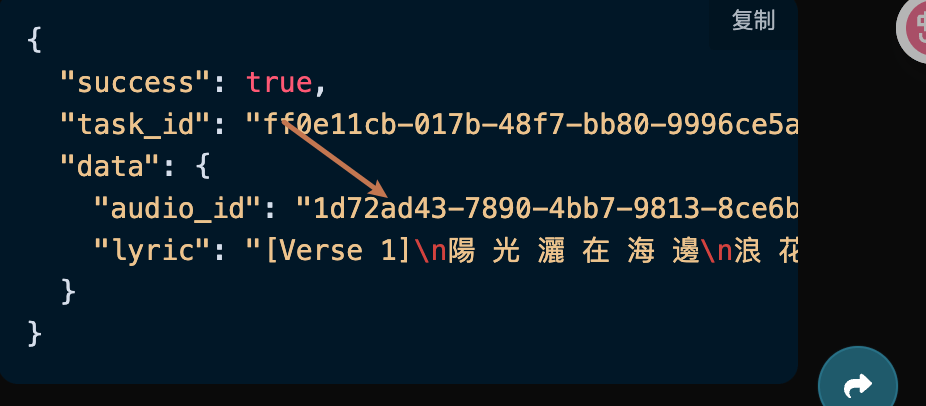
You can specify the following content:
- action: The action for this song task. Currently supported: generate, cover, extend, upload_cover, upload_extend, replace_section, swap_vocals, swap_instrumentals, variation. This cover uses the
coverparameter. - lyric: Lyrics text
- title: The title of the song.
- custom: Whether to generate using custom mode. The default is false.
- audio_id: The ID of the song to be covered.
An example is as follows:

After completing the fields, the following code is automatically generated:

The corresponding code:
curl -X POST 'https://api.qiyaov.com/producer/audios' \
-H 'accept: application/json' \
-H 'authorization: Bearer {token}' \
-H 'content-type: application/json' \
-d '{
  "action": "cover",
  "model": "FUZZ-2.0 Pro",
  "lyric": "[Verse]\nWoke up with the sun in my eyes\nNo clouds above just blue in the skies\nShoes on my feet I’m ready to run\nEvery step feels like a loaded gun\n[Chorus]\nHappy days are rolling in\nLet the joy beneath my skin\nNo more shadows no more lies\nJust the truth that lifts me high\n[Verse 2]\nDancing through the city streets\nA rhythm pounding in my heartbeat\nStrangers smile it’s catching on\nThis world’s a stage we’re all a song\n[Chorus]\nHappy days are rolling in\nLet the joy beneath my skin\nNo more shadows no more lies\nJust the truth that lifts me high\n[Bridge]\nThrow your worries out the door\nLet them sink to the ocean floor\nWe’re alive and it’s enough\nLife is messy but it’s love\n[Chorus]\nHappy days are rolling in\nLet the joy beneath my skin\nNo more shadows no more lies\nJust the truth that lifts me high",
  "audio_id": "38d3b9e2-0dfb-4338-b2a7-15e45656ed32",
  "instrumental": false,
  "custom": true,
  "title": "Cover"
}'
The test is allowed, and the generated result is similar.
{
  "success": true,
  "task_id": "dbca350e-6fb9-46ca-9c7e-4c1a9080806f",
  "trace_id": "a39e0fff-ced8-4b31-ae23-aef3badd90fa",
  "data": [
    {
      "id": "e52dd729-38b4-4c2f-9031-59eb7953c593",
      "title": "Cover",
      "image_url": "https://cdn.acedata.cloud/e724d7f13d.png",
      "lyric": "[Verse]\nWoke up with the sun in my eyes\nNo clouds above just blue in the skies\nShoes on my feet I’m ready to run\nEvery step feels like a loaded gun\n[Chorus]\nHappy days are rolling in\nLet the joy beneath my skin\nNo more shadows no more lies\nJust the truth that lifts me high\n[Verse 2]\nDancing through the city streets\nA rhythm pounding in my heartbeat\nStrangers smile it’s catching on\nThis world’s a stage we’re all a song\n[Chorus]\nHappy days are rolling in\nLet the joy beneath my skin\nNo more shadows no more lies\nJust the truth that lifts me high\n[Bridge]\nThrow your worries out the door\nLet them sink to the ocean floor\nWe’re alive and it’s enough\nLife is messy but it’s love\n[Chorus]\nHappy days are rolling in\nLet the joy beneath my skin\nNo more shadows no more lies\nJust the truth that lifts me high",
      "audio_url": "https://cdn.acedata.cloud/assets/examples/fish/5ade0339-5f11-487e-aacc-06a908271706-8e3fcb0e5547.mp3",
      "video_url": null,
      "image_id": "e52dd729-38b4-4c2f-9031-59eb7953c593",
      "topic": null,
      "seed": "358803418",
      "sound": "",
      "created_at": "2025-12-30T17:32:32.951948Z",
      "model": "FUZZ-2.0 Pro",
      "progress": "100%",
      "state": "succeeded",
      "duration": "153.0659410430839"
    }
  ]
}
¶ Continue Writing a Song
If you want to continue writing a song, we need to pass the action parameter value as: extend. Next, we can customize the generated song based on the lyrics, title, and style.
If you want to continue writing a song that you uploaded yourself, you can set the action parameter to upload_extend, and enter the ID of the custom uploaded song that needs to be continued. The song ID can be obtained using the Producer Upload API, as shown below:
The example is filled in as follows:
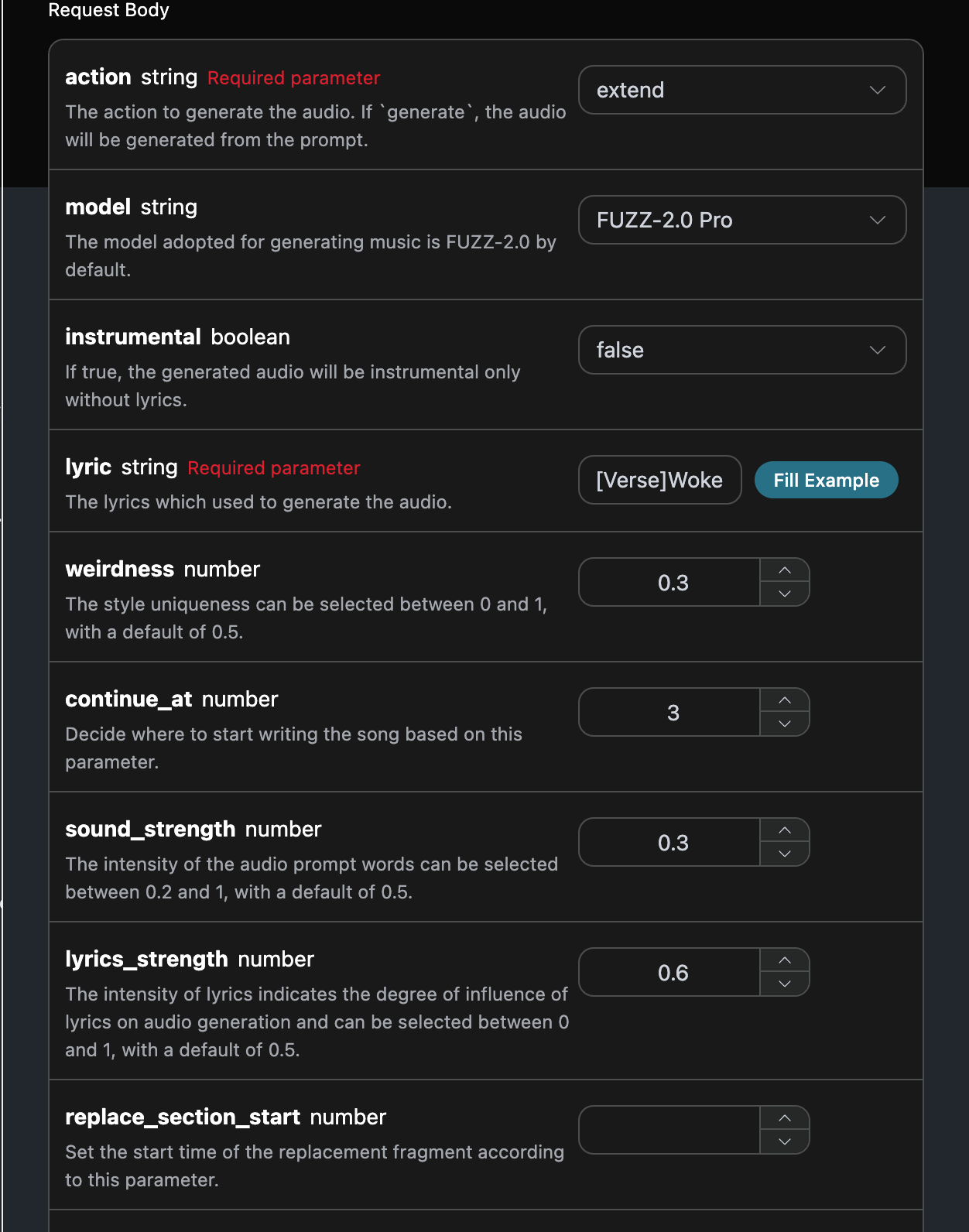
After filling it in, the code is automatically generated as follows:

The corresponding code:
curl -X POST 'https://api.qiyaov.com/producer/audios' \
-H 'accept: application/json' \
-H 'authorization: Bearer {token}' \
-H 'content-type: application/json' \
-d '{
  "action": "extend",
  "model": "FUZZ-2.0 Pro",
  "instrumental": false,
  "lyric": "[Verse]\nWoke up with the sun in my eyes\nNo clouds above just blue in the skies\nShoes on my feet I’m ready to run\nEvery step feels like a loaded gun\n[Chorus]\nHappy days are rolling in\nLet the joy beneath my skin\nNo more shadows no more lies\nJust the truth that lifts me high\n[Verse 2]\nDancing through the city streets\nA rhythm pounding in my heartbeat\nStrangers smile it’s catching on\nThis world’s a stage we’re all a song\n[Chorus]\nHappy days are rolling in\nLet the joy beneath my skin\nNo more shadows no more lies\nJust the truth that lifts me high\n[Bridge]\nThrow your worries out the door\nLet them sink to the ocean floor\nWe’re alive and it’s enough\nLife is messy but it’s love\n[Chorus]\nHappy days are rolling in\nLet the joy beneath my skin\nNo more shadows no more lies\nJust the truth that lifts me high",
  "continue_at": 3,
  "audio_id": "38d3b9e2-0dfb-4338-b2a7-15e45656ed32",
  "custom": true,
  "title": "Extend",
  "weirdness": 0.3,
  "sound_strength": 0.3,
  "lyrics_strength": 0.6
}'
Testing is allowed, and the generated effect is similar.
{
  "success": true,
  "task_id": "834983cb-d62d-4750-b1aa-461da137e51f",
  "trace_id": "6923eee2-7403-432c-8bd1-e471086385b0",
  "data": [
    {
      "id": "d9ebc609-fb65-4a23-b914-c074747af6a4",
      "title": "Extend",
      "image_url": "https://cdn.acedata.cloud/e724d7f13d.png",
      "lyric": "[Verse]\n[Verse]\nWoke up with the sun in my eyes\nNo clouds above just blue in the skies\nShoes on my feet I’m ready to run\nEvery step feels like a loaded gun\n[Chorus]\nHappy days are rolling in\nLet the joy beneath my skin\nNo more shadows no more lies\nJust the truth that lifts me high\n[Verse 2]\nDancing through the city streets\nA rhythm pounding in my heartbeat\nStrangers smile it’s catching on\nThis world’s a stage we’re all a song\n[Chorus]\nHappy days are rolling in\nLet the joy beneath my skin\nNo more shadows no more lies\nJust the truth that lifts me high\n[Bridge]\nThrow your worries out the door\nLet them sink to the ocean floor\nWe’re alive and it’s enough\nLife is messy but it’s love\n[Chorus]\nHappy days are rolling in\nLet the joy beneath my skin\nNo more shadows no more lies\nJust the truth that lifts me high",
      "audio_url": "https://cdn.acedata.cloud/assets/examples/fish/5ade0339-5f11-487e-aacc-06a908271706-8e3fcb0e5547.mp3",
      "video_url": null,
      "image_id": "d9ebc609-fb65-4a23-b914-c074747af6a4",
      "topic": null,
      "seed": "4294469624",
      "sound": "",
      "created_at": "2025-12-30T17:36:14.520928Z",
      "model": "FUZZ-2.0 Pro",
      "progress": "100%",
      "state": "succeeded",
      "duration": "173.87102040816328"
    }
  ]
}
¶ Music Variation
If you want to generate new music with a similar effect based on the seed value of the previous music, we need to pass the action parameter value as: variation. Next, you can customize and generate new music with a similar effect.
The example is filled in as follows:
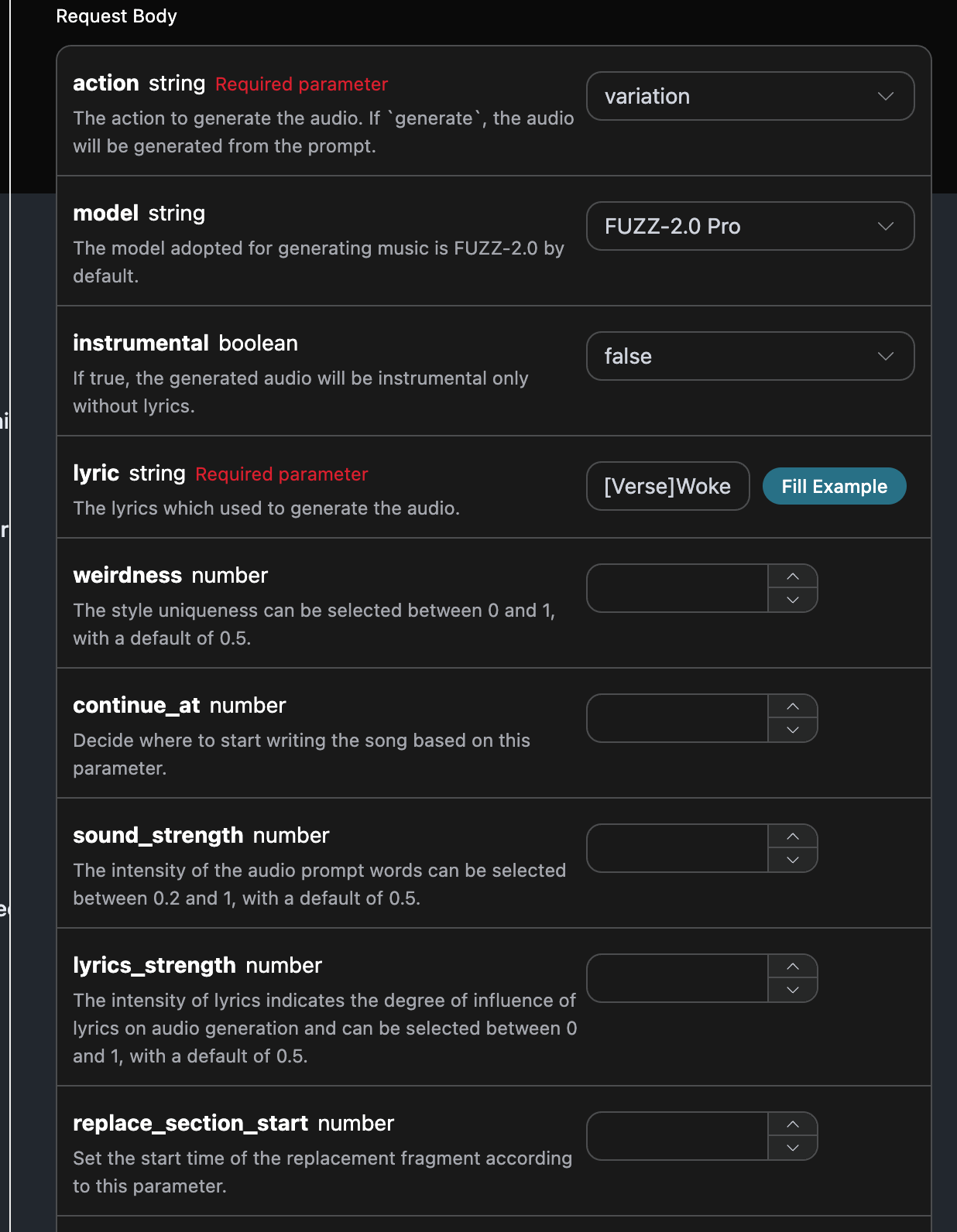
After filling it in, the code is automatically generated as follows:
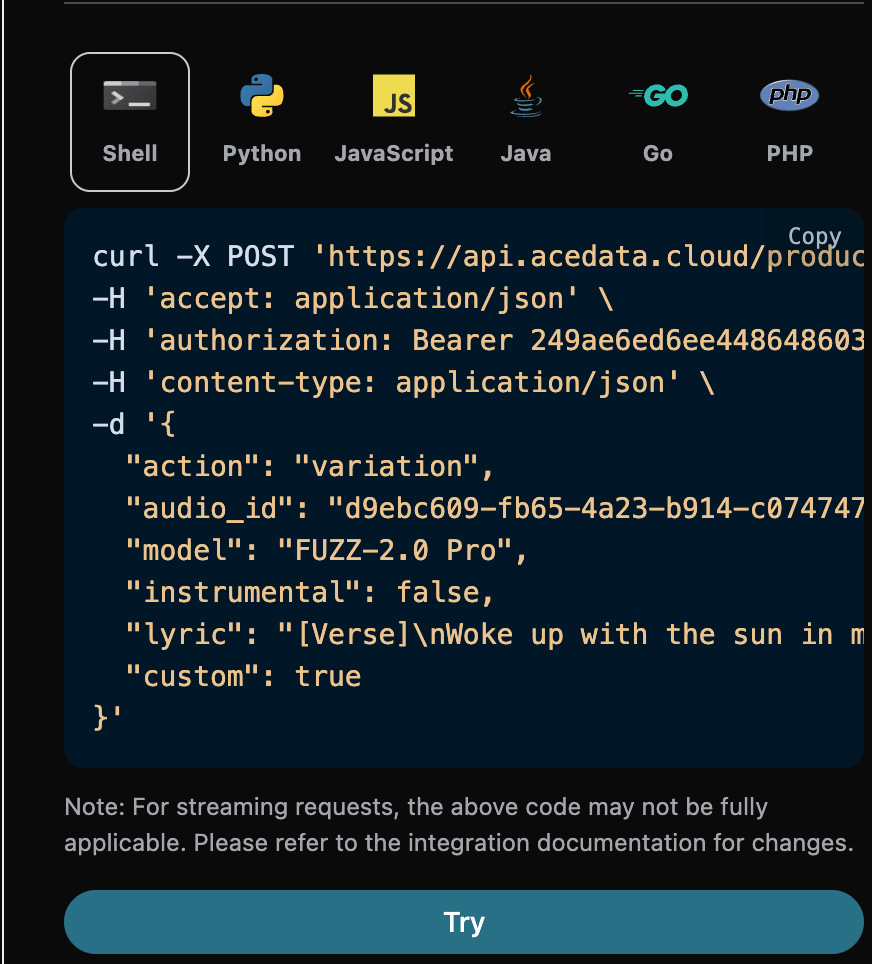
The corresponding code:
curl -X POST 'https://api.qiyaov.com/producer/audios' \
-H 'accept: application/json' \
-H 'authorization: Bearer {token}' \
-H 'content-type: application/json' \
-d '{
  "action": "variation",
  "audio_id": "d9ebc609-fb65-4a23-b914-c074747af6a4",
  "model": "FUZZ-2.0 Pro",
  "instrumental": false,
  "lyric": "[Verse]\nWoke up with the sun in my eyes\nNo clouds above just blue in the skies\nShoes on my feet I’m ready to run\nEvery step feels like a loaded gun\n[Chorus]\nHappy days are rolling in\nLet the joy beneath my skin\nNo more shadows no more lies\nJust the truth that lifts me high\n[Verse 2]\nDancing through the city streets\nA rhythm pounding in my heartbeat\nStrangers smile it’s catching on\nThis world’s a stage we’re all a song\n[Chorus]\nHappy days are rolling in\nLet the joy beneath my skin\nNo more shadows no more lies\nJust the truth that lifts me high\n[Bridge]\nThrow your worries out the door\nLet them sink to the ocean floor\nWe’re alive and it’s enough\nLife is messy but it’s love\n[Chorus]\nHappy days are rolling in\nLet the joy beneath my skin\nNo more shadows no more lies\nJust the truth that lifts me high",
  "custom": true
}'
Testing is allowed, and the generated result is similar.
{
    "success": true,
    "task_id": "3a74da6d-a37d-4b5d-b116-821f455bce39",
    "trace_id": "8e28cce0-0400-4bfd-83db-6d27f97422c7",
    "data": [
        {
            "id": "c14ca458-cd5a-4700-83d4-5249e15f2707",
            "title": "Woke up with the sun in my eyes",
            "image_url": "https://cdn.acedata.cloud/e724d7f13d.png",
            "lyric": "[Verse]\nWoke up with the sun in my eyes\nNo clouds above just blue in the skies\nShoes on my feet I’m ready to run\nEvery step feels like a loaded gun\n[Chorus]\nHappy days are rolling in\nLet the joy beneath my skin\nNo more shadows no more lies\nJust the truth that lifts me high\n[Verse 2]\nDancing through the city streets\nA rhythm pounding in my heartbeat\nStrangers smile it’s catching on\nThis world’s a stage we’re all a song\n[Chorus]\nHappy days are rolling in\nLet the joy beneath my skin\nNo more shadows no more lies\nJust the truth that lifts me high\n[Bridge]\nThrow your worries out the door\nLet them sink to the ocean floor\nWe’re alive and it’s enough\nLife is messy but it’s love\n[Chorus]\nHappy days are rolling in\nLet the joy beneath my skin\nNo more shadows no more lies\nJust the truth that lifts me high",
            "audio_url": "https://cdn.acedata.cloud/assets/examples/fish/5ade0339-5f11-487e-aacc-06a908271706-8e3fcb0e5547.mp3",
            "video_url": null,
            "image_id": "c14ca458-cd5a-4700-83d4-5249e15f2707",
            "topic": null,
            "seed": "2082104582",
            "sound": "",
            "created_at": "2025-12-30T17:48:40.135187Z",
            "model": "FUZZ-2.0",
            "progress": "100%",
            "state": "succeeded",
            "duration": "173.12798185941043"
        }
    ]
}
¶ Replace Section
If you want to replace a section of a song, we need to pass the action parameter value as: replace_section. Next, we need to customize the generated song based on the lyrics and title.
If you want to continue replacing sections of a song you uploaded yourself, you can set the parameter action to upload_replace_section, and enter the ID of the custom uploaded song that needs to continue being extended. The song ID is obtained using the Producer Upload API, as shown below:
The filling example is as follows:
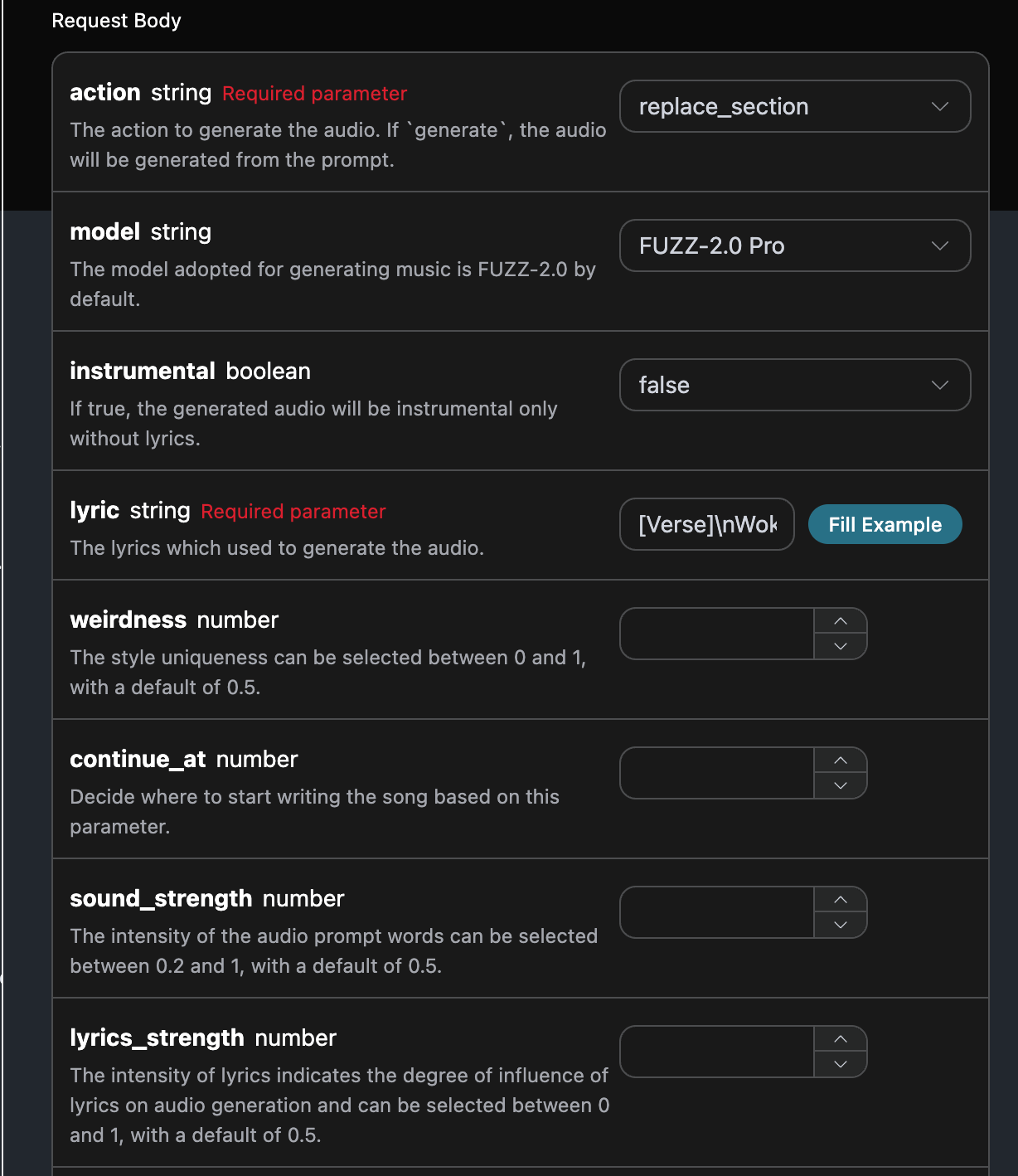
After filling it out, the code is automatically generated as follows:

The corresponding code:
curl -X POST 'https://api.qiyaov.com/producer/audios' \
-H 'accept: application/json' \
-H 'authorization: Bearer {token}' \
-H 'content-type: application/json' \
-d '{
  "action": "replace_section",
  "model": "FUZZ-2.0 Pro",
  "instrumental": false,
  "lyric": "[Verse]\\nWoke up with the sun in my eyes\\nNo clouds above just blue in the skies\\nShoes on my feet I’m ready to run\\nEvery step feels like a loaded gun\\n[Chorus]\\nHappy days are rolling in\\nLet the joy beneath my skin\\nNo more shadows no more lies\\nJust the truth that lifts me high\\n[Verse 2]\\nDancing through the city streets\\nA rhythm pounding in my heartbeat\\nStrangers smile it’s catching on\\nThis world’s a stage we’re all a song\\n[Chorus]\\nHappy days are rolling in\\nLet the joy beneath my skin\\nNo more shadows no more lies\\nJust the truth that lifts me high\\n[Bridge]\\nThrow your worries out the door\\nLet them sink to the ocean floor\\nWe’re alive and it’s enough\\nLife is messy but it’s love\\n[Chorus]\\nHappy days are rolling in\\nLet the joy beneath my skin\\nNo more shadows no more lies\\nJust the truth that lifts me high",
  "audio_id": "d9ebc609-fb65-4a23-b914-c074747af6a4",
  "replace_section_start": 3,
  "replace_section_end": 70,
  "custom": true
}'
Testing is allowed, and the generated result is similar.
{
    "success": true,
    "task_id": "3cb5ae96-01b0-4a37-afb0-e582608af56f",
    "trace_id": "3ebc6f63-5093-4499-bf9b-95c239e0da4f",
    "data": [
        {
            "id": "a54609c6-13e2-4176-be0f-4d7eebc68e1f",
            "title": "Woke up with the sun in my eyes",
            "image_url": "https://cdn.acedata.cloud/e724d7f13d.png",
            "lyric": "[Verse]\\nWoke up with the sun in my eyes\\nNo clouds above just blue in the skies\\nShoes on my feet I’m ready to run\\nEvery step feels like a loaded gun\\n[Chorus]\\nHappy days are rolling in\\nLet the joy beneath my skin\\nNo more shadows no more lies\\nJust the truth that lifts me high\\n[Verse 2]\\nDancing through the city streets\\nA rhythm pounding in my heartbeat\\nStrangers smile it’s catching on\\nThis world’s a stage we’re all a song\\n[Chorus]\\nHappy days are rolling in\\nLet the joy beneath my skin\\nNo more shadows no more lies\\nJust the truth that lifts me high\\n[Bridge]\\nThrow your worries out the door\\nLet them sink to the ocean floor\\nWe’re alive and it’s enough\\nLife is messy but it’s love\\n[Chorus]\\nHappy days are rolling in\\nLet the joy beneath my skin\\nNo more shadows no more lies\\nJust the truth that lifts me high",
            "audio_url": "https://cdn.acedata.cloud/assets/examples/fish/5ade0339-5f11-487e-aacc-06a908271706-8e3fcb0e5547.mp3",
            "video_url": null,
            "image_id": "a54609c6-13e2-4176-be0f-4d7eebc68e1f",
            "topic": null,
            "seed": "14887454",
            "sound": "",
            "created_at": "2025-12-30T18:01:19.907443Z",
            "model": "FUZZ-2.0 Pro",
            "progress": "100%",
            "state": "succeeded",
            "duration": "174.6140589569161"
        }
    ]
}
¶ Instrumental Swap
If you want to use the official instrumental swap operation, you can set the action parameter value to: swap_instrumentals; next, we will customize and generate a song based on the lyrics and title.
The filling example is as follows:
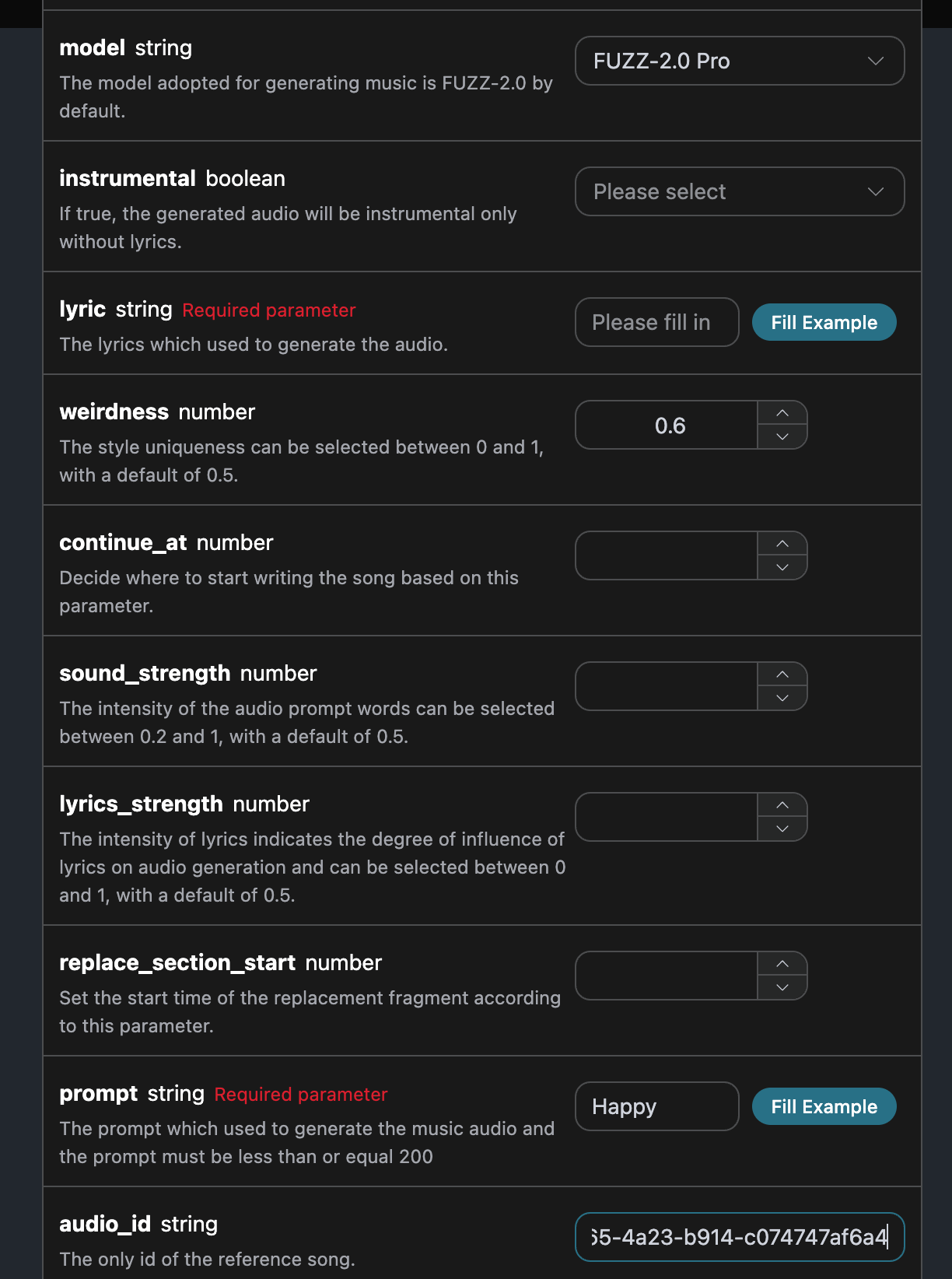
After filling it out, the code is automatically generated as follows:
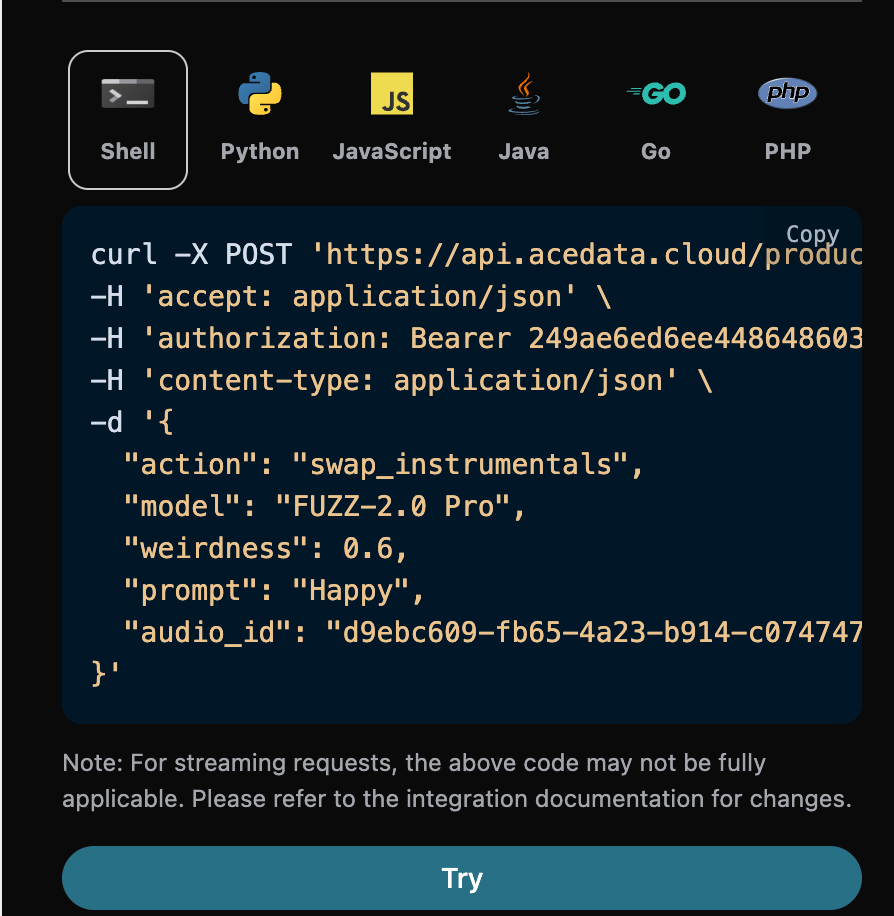
The corresponding code:
curl -X POST 'https://api.qiyaov.com/producer/audios' \
-H 'accept: application/json' \
-H 'authorization: Bearer {token}' \
-H 'content-type: application/json' \
-d '{
  "action": "swap_instrumentals",
  "model": "FUZZ-2.0 Pro",
  "weirdness": 0.6,
  "prompt": "Happy",
  "audio_id": "d9ebc609-fb65-4a23-b914-c074747af6a4"
}'
Testing is allowed, and the generated effect is similar.
{
  "success": true,
  "task_id": "d17d8376-3a58-451d-a976-404719bac11d",
  "trace_id": "ab596807-910a-4e30-bae2-4647895f7d0b",
  "data": [
    {
      "id": "22d7d75c-9e0a-47a8-b22b-eea55eaa0c4b",
      "title": "Extend (Sound swap)",
      "image_url": "https://cdn.acedata.cloud/e724d7f13d.png",
      "lyric": "[Verse]\nWoke up with the sun in my eyes\nNo clouds above just blue in the skies\nShoes on my feet I’m ready to run\nEvery step feels like a loaded gun\n[Chorus]\nHappy days are rolling in\nLet the joy beneath my skin\nNo more shadows no more lies\nJust the truth that lifts me high\n[Verse 2]\nDancing through the city streets\nA rhythm pounding in my heartbeat\nStrangers smile it’s catching on\nThis world’s a stage we’re all a song\n[Chorus]\nHappy days are rolling in\nLet the joy beneath my skin\nNo more shadows no more lies\nJust the truth that lifts me high\n[Bridge]\nThrow your worries out the door\nLet them sink to the ocean floor\nWe’re alive and it’s enough\nLife is messy but it’s love\n[Chorus]\nHappy days are rolling in\nLet the joy beneath my skin\nNo more shadows no more lies\nJust the truth that lifts me high",
      "audio_url": "https://cdn.acedata.cloud/assets/examples/fish/5ade0339-5f11-487e-aacc-06a908271706-8e3fcb0e5547.mp3",
      "video_url": null,
      "image_id": "22d7d75c-9e0a-47a8-b22b-eea55eaa0c4b",
      "topic": null,
      "seed": "2157878068",
      "sound": "Happy",
      "created_at": "2025-12-30T18:09:49.594800Z",
      "model": "FUZZ-2.0 Pro",
      "progress": "100%",
      "state": "succeeded",
      "duration": "172.3849433106576"
    }
  ]
}
¶ Vocal Swap
If you want to use the official vocal swap operation, you can set the action parameter value to: swap_vocals; next, we will customize and generate a song based on the lyrics, title, and style.
The filling example is as follows:
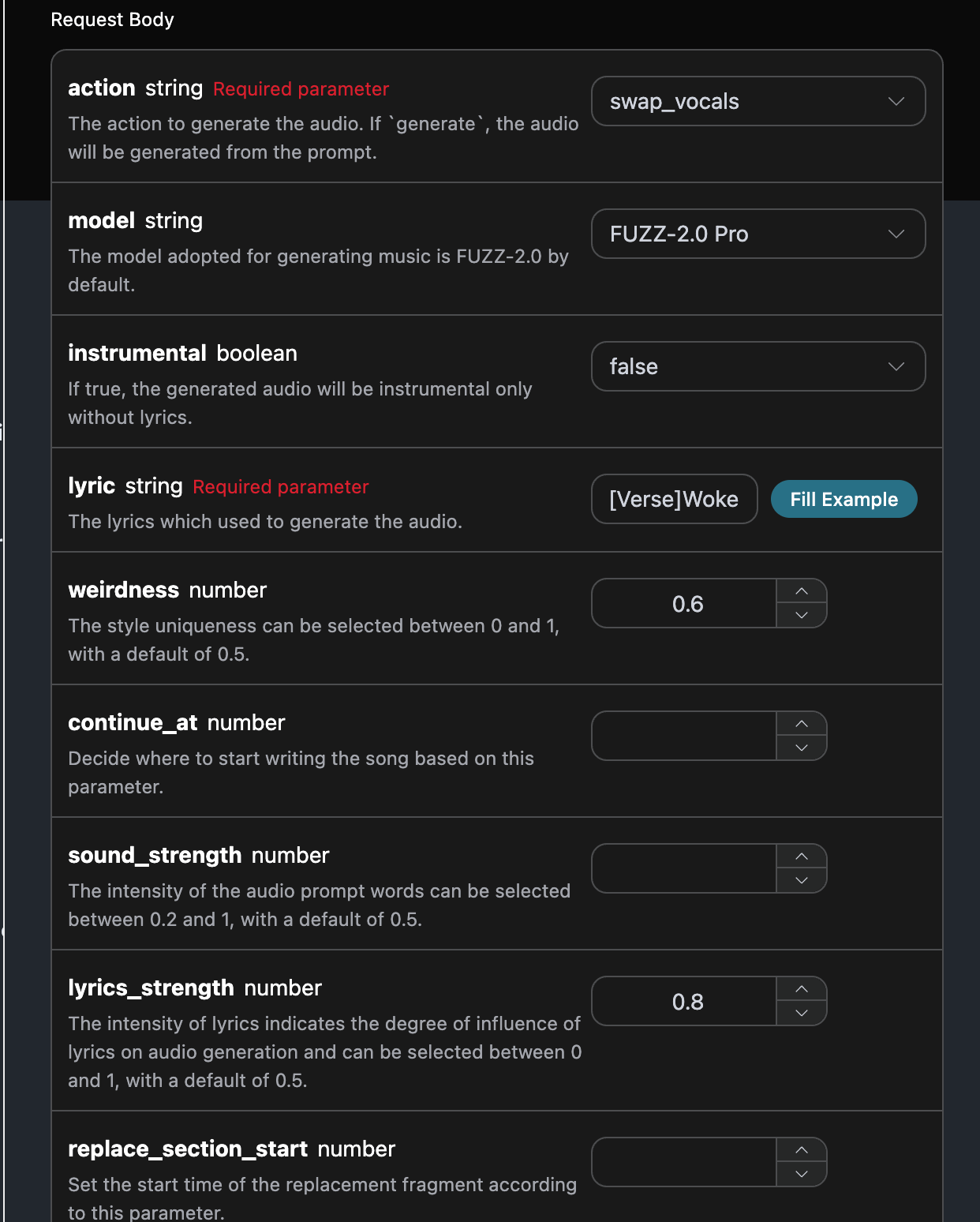
After filling it out, the code is automatically generated as follows:

The corresponding code:
curl -X POST 'https://api.qiyaov.com/producer/audios' \
-H 'accept: application/json' \
-H 'authorization: Bearer {token}' \
-H 'content-type: application/json' \
-d '{
  "action": "swap_vocals",
  "model": "FUZZ-2.0 Pro",
  "instrumental": false,
  "lyric": "[Verse]\nWoke up with the sun in my eyes\nNo clouds above just blue in the skies\nShoes on my feet I’m ready to run\nEvery step feels like a loaded gun\n[Chorus]\nHappy days are rolling in\nLet the joy beneath my skin\nNo more shadows no more lies\nJust the truth that lifts me high\n[Verse 2]\nDancing through the city streets\nA rhythm pounding in my heartbeat\nStrangers smile it’s catching on\nThis world’s a stage we’re all a song\n[Chorus]\nHappy days are rolling in\nLet the joy beneath my skin\nNo more shadows no more lies\nJust the truth that lifts me high\n[Bridge]\nThrow your worries out the door\nLet them sink to the ocean floor\nWe’re alive and it’s enough\nLife is messy but it’s love\n[Chorus]\nHappy days are rolling in\nLet the joy beneath my skin\nNo more shadows no more lies\nJust the truth that lifts me high",
  "weirdness": 0.6,
  "lyrics_strength": 0.8,
  "audio_id": "d9ebc609-fb65-4a23-b914-c074747af6a4",
  "custom": true
}'
Testing is allowed, and the generated effect is similar.
{
  "success": true,
  "task_id": "a903ac38-f129-4f85-9181-b1dc5579bd32",
  "trace_id": "9953af52-45e0-4808-bf13-88f0b21262c1",
  "data": [
    {
      "id": "7b2d653b-aaaa-41b0-b737-aee4c4c5693b",
      "title": "Woke up with the sun in my eyes",
      "image_url": "https://cdn.acedata.cloud/e724d7f13d.png",
      "lyric": "[Verse]\nWoke up with the sun in my eyes\nNo clouds above just blue in the skies\nShoes on my feet I’m ready to run\nEvery step feels like a loaded gun\n[Chorus]\nHappy days are rolling in\nLet the joy beneath my skin\nNo more shadows no more lies\nJust the truth that lifts me high\n[Verse 2]\nDancing through the city streets\nA rhythm pounding in my heartbeat\nStrangers smile it’s catching on\nThis world’s a stage we’re all a song\n[Chorus]\nHappy days are rolling in\nLet the joy beneath my skin\nNo more shadows no more lies\nJust the truth that lifts me high\n[Bridge]\nThrow your worries out the door\nLet them sink to the ocean floor\nWe’re alive and it’s enough\nLife is messy but it’s love\n[Chorus]\nHappy days are rolling in\nLet the joy beneath my skin\nNo more shadows no more lies\nJust the truth that lifts me high",
      "audio_url": "https://cdn.acedata.cloud/assets/examples/fish/5ade0339-5f11-487e-aacc-06a908271706-8e3fcb0e5547.mp3",
      "video_url": null,
      "image_id": "7b2d653b-aaaa-41b0-b737-aee4c4c5693b",
      "topic": null,
      "seed": "2484735707",
      "sound": "",
      "created_at": "2025-12-30T18:13:01.349875Z",
      "model": "FUZZ-2.0 Pro",
      "progress": "100%",
      "state": "succeeded",
      "duration": "173.12798185941043"
    }
  ]
}
¶ Vocal and Instrumental Separation
If you want to use the official vocal and instrumental separation operation, you can set the action parameter value to: stems. Next, we need to separate the vocals and instrumentals based on the song ID.
Fill in the example as follows:
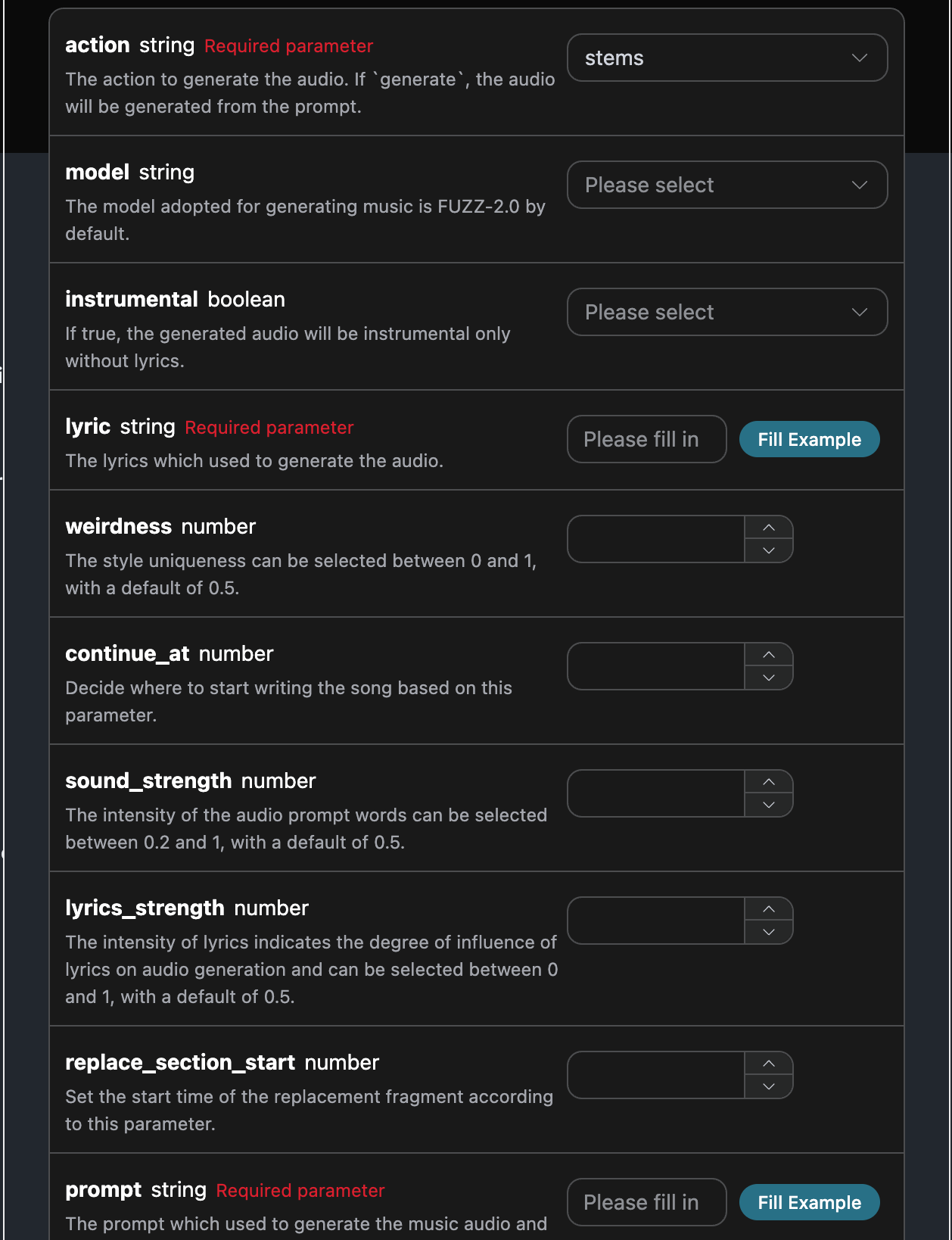
After filling it in, the code is automatically generated as follows:
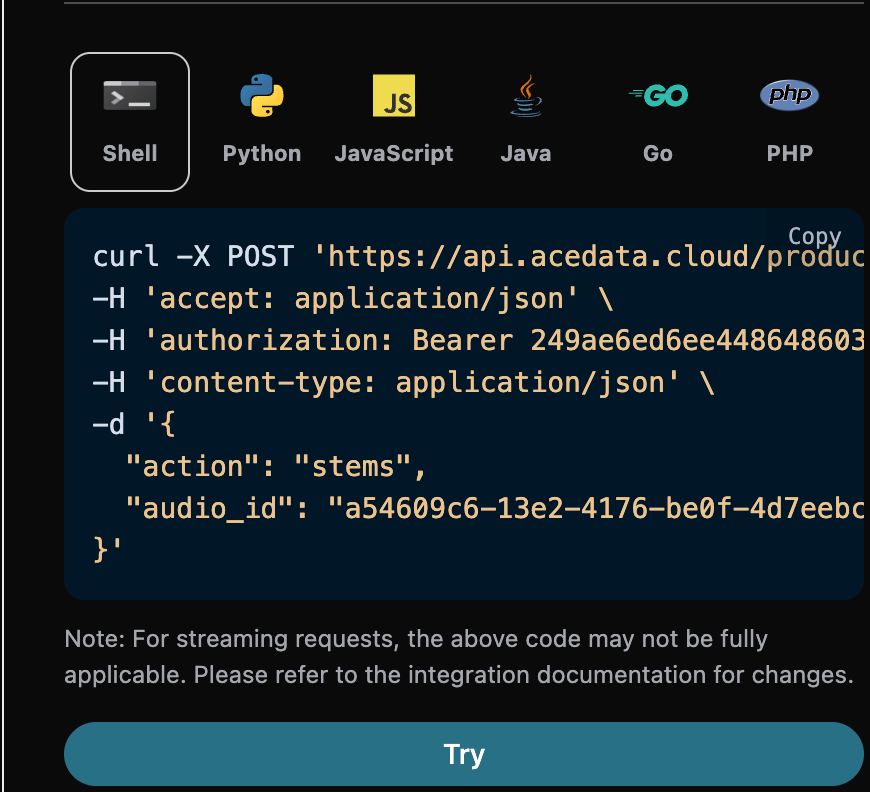
The corresponding code:
curl -X POST 'https://api.qiyaov.com/producer/audios' \
-H 'accept: application/json' \
-H 'authorization: Bearer {token}' \
-H 'content-type: application/json' \
-d '{
  "action": "stems",
  "audio_id": "a54609c6-13e2-4176-be0f-4d7eebc68e1f"
}'
Testing is allowed, and the generated result is similar.
{
    "success": true,
    "task_id": "561ac695-b4aa-47cf-978d-fb7be2b9ebfc",
    "trace_id": "66d0d397-2987-4bde-84fb-a60d0023b217",
    "data": [
        {
            "title": "Woke up with the sun in my eyes",
            "lyric": "",
            "stems_url": "https://platform.cdn.acedata.cloud/producer/561ac695-b4aa-47cf-978d-fb7be2b9ebfc.zip",
            "model": "",
            "progress": "100%",
            "state": "succeeded"
        }
    ]
}
¶ Asynchronous Callback
Since the generation time of the Producer Audios Generation API can sometimes be relatively long, if the API does not respond for a long time, the HTTP request will remain connected, resulting in additional system resource consumption. Therefore, this API also provides support for asynchronous callbacks.
The overall process is: when the client initiates a request, it additionally specifies a callback_url field. After the client initiates the API request, the API will immediately return a result containing a task_id field, representing the current task ID. When the task is completed, the result of the generation task will be sent in the form of POST JSON to the callback_url specified by the client, which also includes the task_id field, so that the task result can be associated through the ID.
Next, let us understand the specific operation through an example.
First, a Webhook callback is a service that can receive HTTP requests. Developers should replace it with the URL of their own deployed HTTP server. For demonstration convenience, a public Webhook sample website https://webhook.site/ is used here. Open this website to obtain a Webhook URL, as shown in the figure:

Copy this URL, and it can be used as a Webhook. The example here is https://webhook.site/#!/view/0d73431d-f833-4be4-9276-b6e1690d55c1.
Next, we can set the field callback_url to the above Webhook URL, while filling in the corresponding parameters. The specific content is shown in the figure:
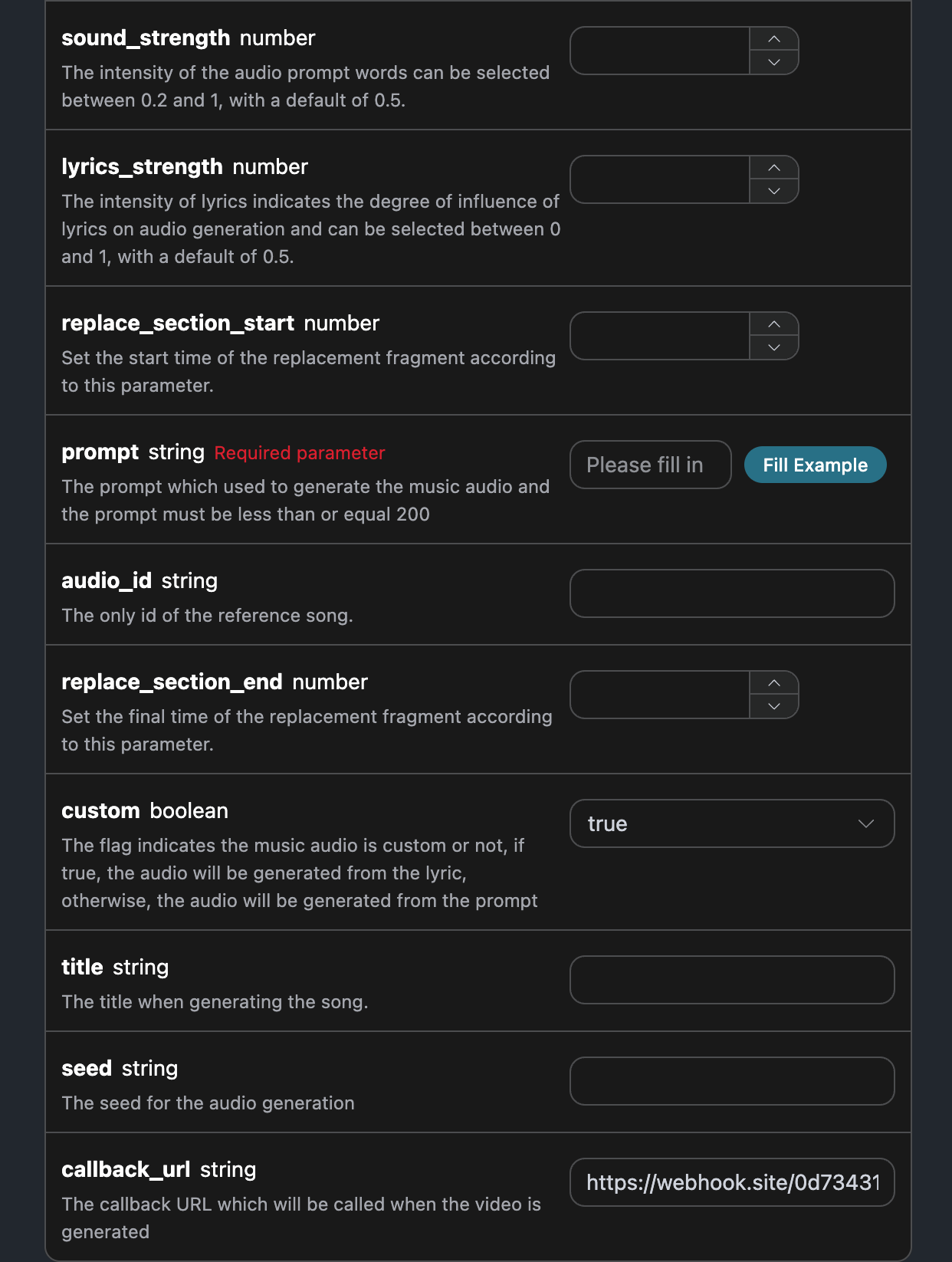
Click Run, and you can see that a result is returned immediately, as follows:
{
  "task_id": "1a6ac2ad-10f2-4e2b-b500-66ec27fe82ad"
}
After waiting for a moment, we can observe the result of the generation task on https://webhook.site/#!/view/0d73431d-f833-4be4-9276-b6e1690d55c1, as shown in the figure:
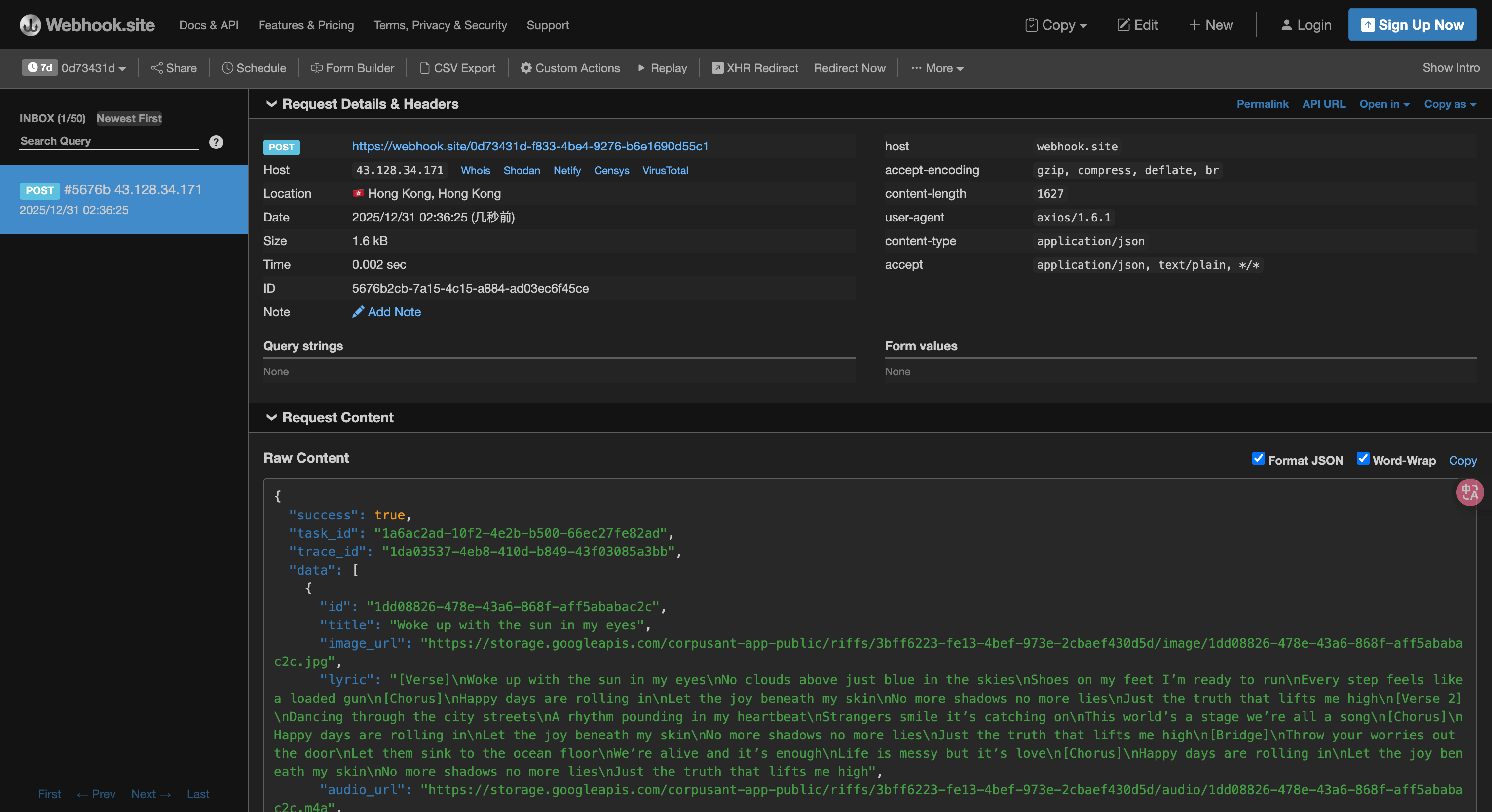
The content is as follows:
{
    "success": true,
    "task_id": "1a6ac2ad-10f2-4e2b-b500-66ec27fe82ad",
    "trace_id": "1da03537-4eb8-410d-b849-43f03085a3bb",
    "data": [
        {
            "id": "1dd08826-478e-43a6-868f-aff5ababac2c",
            "title": "Woke up with the sun in my eyes",
            "image_url": "https://cdn.acedata.cloud/e724d7f13d.png",
            "lyric": "[Verse]\nWoke up with the sun in my eyes\nNo clouds above just blue in the skies\nShoes on my feet I’m ready to run\nEvery step feels like a loaded gun\n[Chorus]\nHappy days are rolling in\nLet the joy beneath my skin\nNo more shadows no more lies\nJust the truth that lifts me high\n[Verse 2]\nDancing through the city streets\nA rhythm pounding in my heartbeat\nStrangers smile it’s catching on\nThis world’s a stage we’re all a song\n[Chorus]\nHappy days are rolling in\nLet the joy beneath my skin\nNo more shadows no more lies\nJust the truth that lifts me high\n[Bridge]\nThrow your worries out the door\nLet them sink to the ocean floor\nWe’re alive and it’s enough\nLife is messy but it’s love\n[Chorus]\nHappy days are rolling in\nLet the joy beneath my skin\nNo more shadows no more lies\nJust the truth that lifts me high",
            "audio_url": "https://cdn.acedata.cloud/assets/examples/fish/5ade0339-5f11-487e-aacc-06a908271706-8e3fcb0e5547.mp3",
            "video_url": null,
            "image_id": "1dd08826-478e-43a6-868f-aff5ababac2c",
            "topic": null,
            "seed": "1490770667",
            "sound": "",
            "created_at": "2025-12-30T18:36:00.994141Z",
            "model": "FUZZ-2.0 Pro",
            "progress": "100%",
            "state": "succeeded",
            "duration": "135.2330158730159"
        }
    ]
}
It can be seen that there is a task_id field in the result. The other fields are similar to those above, and task association can be achieved through this field.
¶ Error Handling
When calling the API, if an error is encountered, the API will return the corresponding error code and information. For example:
400 token_mismatched: Bad request, possibly due to missing or invalid parameters.400 api_not_implemented: Bad request, possibly due to missing or invalid parameters.401 invalid_token: Unauthorized, invalid or missing authorization token.429 too_many_requests: Too many requests, you have exceeded the rate limit.500 api_error: Internal server error, something went wrong on the server.
¶ Error Response Example
{
  "success": false,
  "error": {
    "code": "api_error",
    "message": "fetch failed"
  },
  "trace_id": "2cf86e86-22a4-46e1-ac2f-032c0f2a4e89"
}
¶ Conclusion
Through this document, you have learned how to use the Producer Audios Generation API to generate music by entering prompts. We hope this document can help you better integrate with and use this API. If you have any questions, please feel free to contact our technical support team.