

SeeDance Videos Generation API Integration Guide
This article will introduce a SeeDance Videos Generation API integration guide, which can generate official SeeDance videos by entering custom parameters.
¶ Application Process
To use the SeeDance Videos Generation API, first go to the qiyaov Console to obtain your API Token for later use.

If you have not logged in or registered, you will be automatically redirected to the login page and invited to register and log in. After completion, you will automatically return to the current page.
One API Token can call all platform services; there is no need to apply separately for each service. Your first application will receive free credits for a free trial; when credits are insufficient, you can recharge your general balance in the Console.
📘 Full documentation: SeeDance Videos Generation API →
¶ Basic Usage
First, let's understand the basic usage method: enter the prompt content.text, the type content.type=text, and the model model, and you can obtain the processed result. The specific content is as follows:

You can see that we have set Request Headers here, including:
accept: The format of the response result you want to receive. Enterapplication/jsonhere, which is JSON format.authorization: The key for calling the API. After applying, you can directly select it from the dropdown.
In addition, we have set Request Body, including:
model: The model for generating videos.- Seedance 1.x Series:
doubao-seedance-1-0-pro-250528,doubao-seedance-1-0-pro-fast-251015,doubao-seedance-1-5-pro-251215,doubao-seedance-1-0-lite-t2v-250428,doubao-seedance-1-0-lite-i2v-250428. - Seedance 2.0 Series (supports character and audio-video multimodal references):
doubao-seedance-2-0-260128(Standard),doubao-seedance-2-0-fast-260128(Fast),doubao-seedance-2-0-mini-260615(Mini). - Seedance 2.5:
doubao-seedance-2-5-260628, supports up to 30 seconds, pure audio references, more materials, video editing, and extension.
- Seedance 1.x Series:
content: Input content array.typecan betext(prompt),image_url(reference image),audio_url(reference audio), orvideo_url(reference video). Images can specify their purpose throughrole:first_frame(first frame) /last_frame(last frame) /reference_image(character / subject reference).resolution: Output resolution. Options include480p/720p/1080p/4k. Version 2.5 supports 480p, 720p, and 1080p; 2.0 Fast/Mini supports 480p and 720p; 2.0 Standard supports up to 4k.ratio: Aspect ratio. Options include16:9/4:3/1:1/3:4/9:16/21:9/adaptive.duration: Video duration (seconds, integer). 2–12 for the 1.0 series; 4–12 for 1.5 Pro; 4–15 for the 2.0 series; 4–30 for 2.5. Version 1.5/2.x supports-1(automatic duration).seed: Random seed, integer, from -1 to 4294967295.camerafixed: Whether to fix the camera,true/false.watermark: Whether to add a watermark,true/false.generate_audio: Whether to generate a video with audio,true/false, supported by Seedance 1.5 Pro and the 2.x series.return_last_frame: Whether to return the image URL of the video's last frame in the result.omni_reference_task_type: 2.5 only;auto/reference/edit/extend.output_format: 2.5 only;mp4/mov, default ismp4.tools: 2.5 only; currently supports theweb_searchonline search tool, which can limit the number of results, number of keywords, and search sources.priority: Optional task priority for 2.5, integer 0–9, default is 0.safety_identifier: A stable anonymous end-user identifier of up to 64 characters; please use a hash or internal anonymous ID, and do not pass names, email addresses, or mobile phone numbers.execution_expires_after: Task timeout period (seconds), ranging from 3600–259200.callback_url: Asynchronous callback address. After setting it, the API immediately returnstask_id, and POSTs the result to this address when the task is completed.async: Optional. When set totrue, the API immediately returnstask_id, without needing to providecallback_url; then use the corresponding task query API to poll for the result.
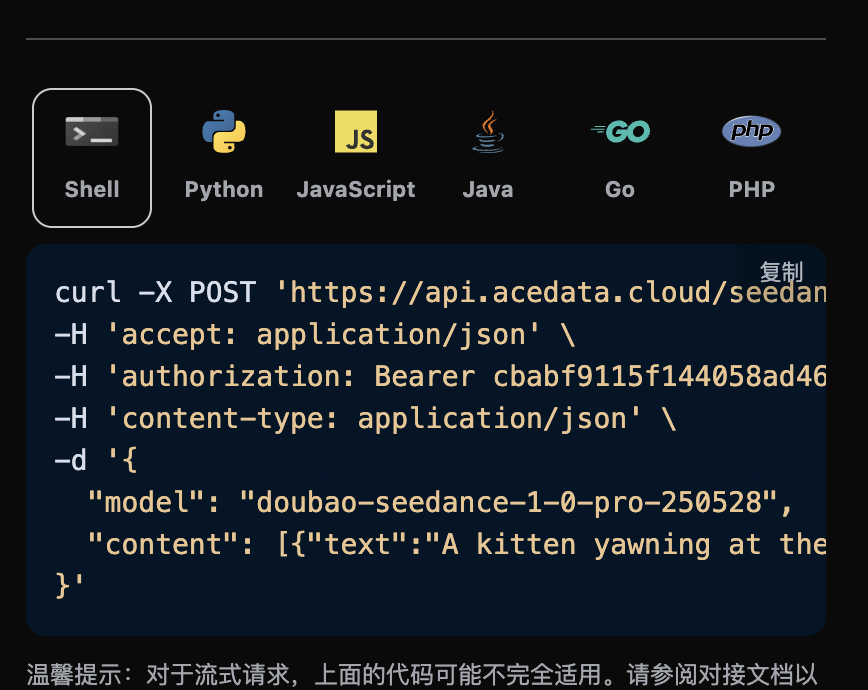
After selecting, you can find that the corresponding code is also generated on the right, as shown in the figure:
Click the "Try" button to perform a test. As shown above, we obtain the following result:
{
  "success": true,
  "task_id": "9777f36b-4f44-47ff-962d-45cd2f7aeaa8",
  "trace_id": "ce5da2ca-6695-4459-9d2c-2ef9f86db752",
  "data": {
    "task_id": "7e4e1773-510a-4a73-9ab4-98dd1a0b2a7f",
    "status": "succeeded",
    "model": "doubao-seedance-2-0-fast-260128",
    "duration": 5,
    "resolution": "720p",
    "ratio": "16:9",
    "video_url": "https://cdn.acedata.cloud/assets/examples/seedance/036f24ed-a9b1-49b3-92c4-30049a3bc152-102bf9f98e35.mp4"
  }
}
There are multiple fields in the returned result, introduced as follows:
success, the status of the video generation task at this time.task_id, the ID of the video generation task at this time.trace_id, the tracking ID of the video generation at this time.data, the result list of the video generation task at this time.task_id, the server-side ID of the video generation task at this time.video_url, the video link of the video generation task at this time.status, the status of the video generation task at this time.model, the model used to generate the video.
You can see that we have obtained satisfactory video information. We only need to retrieve the generated SeeDance video according to the video link address in data in the result.
In addition, if you want to generate the corresponding integration code, you can directly copy and generate it. For example, the CURL code is as follows:
curl -X POST 'https://api.qiyaov.com/seedance/videos' \
-H 'authorization: Bearer ${bearer_token}' \
-H 'accept: application/json' \
-H 'content-type: application/json' \
-d '{
  "content": [{"type":"text","text":"A white ceramic coffee mug on a glossy marble countertop with soft morning window light. The camera slowly orbits 360 degrees around the mug, steam gently rising."}],
  "model": "doubao-seedance-2-0-fast-260128",
  "resolution": "720p",
  "ratio": "16:9",
  "duration": 5
}'
¶ Inline Parameter Description
At the end of the content[].text prompt, generation parameters can be passed by appending them in the form of --parameter value (legacy method, weak validation, defaults are automatically used when values are invalid). The complete parameter list is as follows:
| Inline Parameter | Corresponding Field | Description | Value Range |
|---|---|---|---|
--rs |
resolution |
Output resolution | 480p / 720p / 1080p |
--rt |
ratio |
Aspect ratio | 16:9 / 4:3 / 1:1 / 3:4 / 9:16 / 21:9 / adaptive |
--dur |
duration |
Video duration (seconds) | 2–12 |
--frames |
frames |
Video frame count | Integers in [29, 289] that satisfy 25+4n (only supported by the 1.0 series) |
--fps |
framespersecond |
Frame rate | Only 24 is supported |
--seed |
seed |
Random seed | -1 to 4294967295 |
--cf |
camerafixed |
Whether to fix the camera | true / false |
--wm |
watermark |
Whether to add a watermark | true / false |
Recommended practice: Directly use the corresponding top-level fields (such as
resolution,ratio, etc.) in the Request Body. This is strong validation mode, and clear error messages will be returned when parameters are invalid, making it easier to troubleshoot issues.
¶ Generate Videos with Audio
Seedance 1.5 Pro and the 2.x series support generating videos with audio through the generate_audio parameter:
{
  "model": "doubao-seedance-1-5-pro-251215",
  "content": [
    {
      "type": "text",
      "text": "A girl holds a fox, the wind blows her hair, you can hear the sound of the wind"
    }
  ],
  "generate_audio": true,
  "ratio": "16:9",
  "duration": 5
}
The 1.0 series does not support this parameter.
¶ Seedance 2.5 Omnimodal Generation, Editing, and Extension
doubao-seedance-2-5-260628 supports 480p / 720p / 1080p, 4–30 seconds or automatic duration, and raises the material limit to 30 reference images, 10 reference videos, and 10 reference audios (up to 50 in total). Version 2.5 also supports passing only reference audio, without requiring images or videos at the same time.
For regular omnimodal generation, omni_reference_task_type can be omitted, set to auto, or explicitly set to reference. Video editing and extension must include reference_video:
{
  "model": "doubao-seedance-2-5-260628",
  "content": [
    {"type": "text", "text": "Replace the sky with a warm sunset while preserving the subject and camera motion."},
    {"type": "video_url", "role": "reference_video", "video_url": {"url": "https://cdn.acedata.cloud/input.mp4"}}
  ],
  "resolution": "720p",
  "ratio": "adaptive",
  "duration": -1,
  "omni_reference_task_type": "edit",
  "output_format": "mov"
}
reference: Pass at least onereference_image,reference_video, orreference_audio; version 2.5 supports passing only reference audio.edit: Must useratio: adaptiveandduration: -1; output duration is billed based on the actual result.extend: Must useratio: adaptive;durationcan be 4–30 or-1.auto: The model automatically selects generation, editing, or extension based on the prompt and materials.- When the task type does not match the materials or prompt, the task will fail and return a locatable parameter error; please adjust according to the above constraints and resubmit.
¶ First Frame for Image-to-Video
If you want an image-to-video task, first the content parameter needs to include an item with type set to image_url, and the image_url field must be in object format: {"url": "https://..."} or Base64 format {"url": "data:image/png;base64,..."}.
Note:
image_urldoes not support directly passing a string format (such as"image_url": "https://cdn.acedata.cloud/e724d7f13d.png"). You must use the object format"image_url": {"url": "https://..."}, otherwise a 400 error will be returned.
The corresponding code:
import requests

url = "https://api.qiyaov.com/seedance/videos"

headers = {
    "accept": "application/json",
    "authorization": "Bearer {token}",
    "content-type": "application/json"
}

payload = {
    "content": [
        {
            "type": "image_url",
            "image_url": {
                "url": "https://ark-project.tos-cn-beijing.volces.com/doc_image/i2v_foxrgirl.png"
            }
        },
        {
            "type": "text",
            "text": "A girl holds a fox in her arms. She opens her eyes and gazes tenderly at the camera, while the fox affectionately holds her back. As the camera slowly pulls away, her hair is gently blown by the wind. --ratio adaptive  --dur 5"
        }
    ],
    "model": "doubao-seedance-1-0-pro-250528"
}

response = requests.post(url, json=payload, headers=headers)
print(response.text)
Click Run, and you can see that a result is immediately obtained, as follows:
{
    "success": true,
    "task_id": "dc7cceb5-3c12-4de7-a5f4-abcbba3e8e39",
    "trace_id": "b3b09de3-b7fa-4bb0-88b5-aad4b4a96fd4",
    "data": {
        "task_id": "cgt-20251222072003-x2259",
        "status": "succeeded",
        "video_url": "https://platform.cdn.acedata.cloud/seedance/6afb78b8-5ba8-424f-adcd-69423a700b50.mp4",
        "model": "doubao-seedance-1-0-pro-250528"
    }
}
As you can see, the generated effect is image-generated video, and the result is similar to the above.
¶ First and Last Frames for Image-to-Video
If you want the first and last frames for image-to-video, first the content parameter must pass the type image_url, and set role to first_frame and last_frame respectively, then you can specify the following content:
- role: Specify the first frame or last frame.
- image_url
- url Image link
At the same time,
contentalso needs to enter the typetextas the prompt.
- url Image link
At the same time,
The corresponding code:
import requests

url = "https://api.qiyaov.com/seedance/videos"

headers = {
    "accept": "application/json",
    "authorization": "Bearer {token}",
    "content-type": "application/json"
}

payload = {
   "model": "doubao-seedance-1-0-pro-250528",
    "content": [
         {
            "type": "text",
            "text": "360-degree shot"
        },
        {
            "type": "image_url",
            "image_url": {
                "url": "https://ark-project.tos-cn-beijing.volces.com/doc_image/seepro_first_frame.jpeg"
            },
            "role": "first_frame"
        },
        {
            "type": "image_url",
            "image_url": {
                "url": "https://ark-project.tos-cn-beijing.volces.com/doc_image/seepro_last_frame.jpeg"
            },
            "role": "last_frame"
        }
    ]
}

response = requests.post(url, json=payload, headers=headers)
print(response.text)
Click Run, and you can see that a result is returned immediately, as follows:
{
    "success": true,
    "task_id": "f7096c6c-9430-4392-8201-d259632d7afd",
    "trace_id": "4a4a3721-00fb-43d2-aff2-3b516ac01a8a",
    "data": {
        "task_id": "cgt-20251222073134-54qcw",
        "status": "succeeded",
        "video_url": "https://platform.cdn.acedata.cloud/seedance/95f9f5f0-fc50-4c71-bc6f-e154582c141e.mp4",
        "model": "doubao-seedance-1-0-pro-250528"
    }
}
As you can see, the generated result is a character-generated video, similar to the above.
¶ Character and Audio-Video Multimodal References (Seedance 2.0)
The Seedance 2.0 series (doubao-seedance-2-0-260128, doubao-seedance-2-0-fast-260128, doubao-seedance-2-0-mini-260615) supports reference_image, reference_audio, and reference_video. You can use your own or authorized materials to maintain consistency of characters, subjects, actions, camera movements, voices, and rhythms.
Please upload only your own or authorized real-person and character materials. Different models support real-person materials differently; the request format remains unchanged, and a clear error will be returned if the material does not meet the requirements.
Key points for use:
- Only Seedance 2.0 series models support
reference_image; for 1.x models, please usefirst_frame/last_frame(first and last frames for image-to-video). - Image-to-video first frame, image-to-video first and last frames, and full-modal references are three mutually exclusive scenarios:
first_frame/last_framecannot be used together withreference_image/reference_video/reference_audio. - If you want to specify the first and last frames in full-modal references, mark the images as
reference_image, and state in the prompt “image 1 as the first frame” or “image 2 as the last frame”; if you need to strictly lock the first and last frames, use onlyfirst_frame/last_frame. - Multimodal reference quantity limits: up to 9
image_urlimages; 2.0 also supportsaudio_url(roleisreference_audio, up to 3 items) andvideo_url(roleisreference_video, up to 3 items). - Reference audio (
audio_url) material requirements: formatwav/mp3; each item must be 2–15 seconds long, with up to 3 items and a total duration not exceeding 15 seconds; each item must not exceed 15 MB. Exceeding the duration range will cause failure during the material processing stage. - Reference video (
video_url) material requirements: formatmp4/mov; each item must be 2–15 seconds long, with up to 3 items and a total duration not exceeding 15 seconds. - For reference images, it is recommended to use photos with a single person, front-facing face, clear image, and no obstruction. The clearer the face, the higher the similarity.
¶ Example 1: Close-Up That Preserves Facial Appearance
Pass in a face photo and have the person smile and wave at the camera. The corresponding code:
import requests

url = "https://api.qiyaov.com/seedance/videos"

headers = {
    "accept": "application/json",
    "authorization": "Bearer {token}",
    "content-type": "application/json"
}

payload = {
    "model": "doubao-seedance-2-0-fast-260128",
    "content": [
        {
            "type": "text",
            "text": "The woman looks at the camera, gives a warm natural smile and waves her hand, soft studio lighting, gentle camera push-in."
        },
        {
            "type": "image_url",
            "role": "reference_image",
            "image_url": {
                "url": "https://cdn.acedata.cloud/assets/examples/nanobanana/8e075897-0f50-4443-8500-666751791c6c-4346f66287c0.jpg"
            }
        }
    ],
    "resolution": "480p",
    "ratio": "9:16",
    "duration": 5
}

response = requests.post(url, json=payload, headers=headers)
print(response.text)
The returned result is as follows; the person in the generated video remains consistent with the reference photo:
{
  "success": true,
  "task_id": "895eb5ea-bbe1-41a3-a9e9-48608e03f93a",
  "trace_id": "83544791-7a84-44de-b8d2-afe171a1c0e4",
  "data": {
    "task_id": "458abf29-cc39-4fd0-bcea-24f89a70d8de",
    "status": "succeeded",
    "video_url": "https://cdn.acedata.cloud/assets/examples/seedance/e71d3cc5-27e7-4719-be34-1f0e254eccaf-a56b2736a4e0.mp4",
    "model": "doubao-seedance-2-0-fast-260128",
    "resolution": "480p",
    "ratio": "9:16",
    "duration": 5
  }
}
¶ Example 2: Put the Same Person Into a Brand-New Scene
The strength of reference_image lies in this: it retains only the person's identity, while the scene, clothing, and actions are entirely determined by the prompt. Below, the same face photo is used to have the person walk through an autumn park wearing a beige coat:
{
  "model": "doubao-seedance-2-0-fast-260128",
  "content": [
    {
      "type": "text",
      "text": "The same woman wearing a beige coat walks through a sunny autumn park, golden leaves falling around her, she smiles softly at the camera, cinematic tracking shot."
    },
    {
      "type": "image_url",
      "role": "reference_image",
      "image_url": {
        "url": "https://cdn.acedata.cloud/assets/examples/nanobanana/8e075897-0f50-4443-8500-666751791c6c-4346f66287c0.jpg"
      }
    }
  ],
  "resolution": "720p",
  "ratio": "9:16",
  "duration": 5
}
The returned result is as follows; the person's appearance is retained, while the scene has been switched to an autumn park:
{
  "success": true,
  "task_id": "00872de7-16b7-431f-b4f7-6bf38ae86157",
  "trace_id": "577a07c3-4f5f-4cc7-86fe-535bb8332614",
  "data": {
    "task_id": "32fe1537-ba3e-452a-8749-3ef8890d37fd",
    "status": "succeeded",
    "video_url": "https://cdn.acedata.cloud/assets/examples/seedance/44f47593-556b-4fda-afa5-7a71eefcd228-2161efa5dd09.mp4",
    "model": "doubao-seedance-2-0-fast-260128",
    "resolution": "720p",
    "ratio": "9:16",
    "duration": 5
  }
}
💡 If you want the character to precisely replicate the composition in the photo (rather than "the same person in a different scene"), you can use
first_frame(the first frame of image-to-video) instead, allowing the video to start moving from this photo.
¶ Asynchronous Callback
Since the SeeDance Videos Generation API takes a relatively long time to generate (approximately 1–2 minutes), you can use asynchronous mode through the callback_url field to avoid keeping the HTTP connection occupied for a long time.
Overall process: When the client initiates a request, it specifies callback_url, and the API immediately returns a response containing task_id; after the task is completed, the platform sends the generation result to callback_url as POST JSON, and the result also contains task_id for association.
{
  "task_id": "f7096c6c-9430-4392-8201-d259632d7afd"
}
When the task is completed, the platform pushes the following content to callback_url:
{
  "success": true,
  "task_id": "f7096c6c-9430-4392-8201-d259632d7afd",
  "trace_id": "4a4a3721-00fb-43d2-aff2-3b516ac01a8a",
  "data": {
    "task_id": "cgt-20251222073134-54qcw",
    "status": "succeeded",
    "video_url": "https://platform.cdn.acedata.cloud/seedance/95f9f5f0-fc50-4c71-bc6f-e154582c141e.mp4",
    "model": "doubao-seedance-1-0-pro-250528"
  }
}
The task_id field in the result is consistent with the one returned during the request, and this field can be used to associate the task.
¶ Error Handling
When calling the API, if an error occurs, the API returns the corresponding error code and information. For example:
400 token_mismatched: Bad request, possibly due to missing or invalid parameters.400 api_not_implemented: Bad request, possibly due to missing or invalid parameters.401 invalid_token: Unauthorized, invalid or missing authorization token.429 too_many_requests: Too many requests, you have exceeded the rate limit.500 api_error: Internal server error, something went wrong on the server.
¶ Error Response Example
{
  "success": false,
  "error": {
    "code": "api_error",
    "message": "fetch failed"
  },
  "trace_id": "2cf86e86-22a4-46e1-ac2f-032c0f2a4e89"
}
¶ Conclusion
Through this document, you have learned how to use the Seedance Videos Generation API for text-to-video generation, first-and-last-frame and multimodal reference generation, as well as using Seedance 2.5 to edit or extend videos. We hope this document can help you complete the API integration; if you have any questions, please contact technical support.